How to make an HMI heartbeat tag on EBPro and have the PLC read the value? I need to test communications of gates while in “remote mode” and am struggling to make an internal HMI tag that updates every x seconds etc.
Creating an HMI heartbeat tag readable by PLC
none
0.0
0
Hi @jperry ,
Thank you for your question. To accomplish this, we would recommend creating a macro that executes periodically and uses both the GetData and SetData functions to send and receive the heartbeat values.
Here are a few helpful resources for creating and configuring macros in EasyBuilder Pro:
do you have an example macro I could start with?
Hi @jperry ,
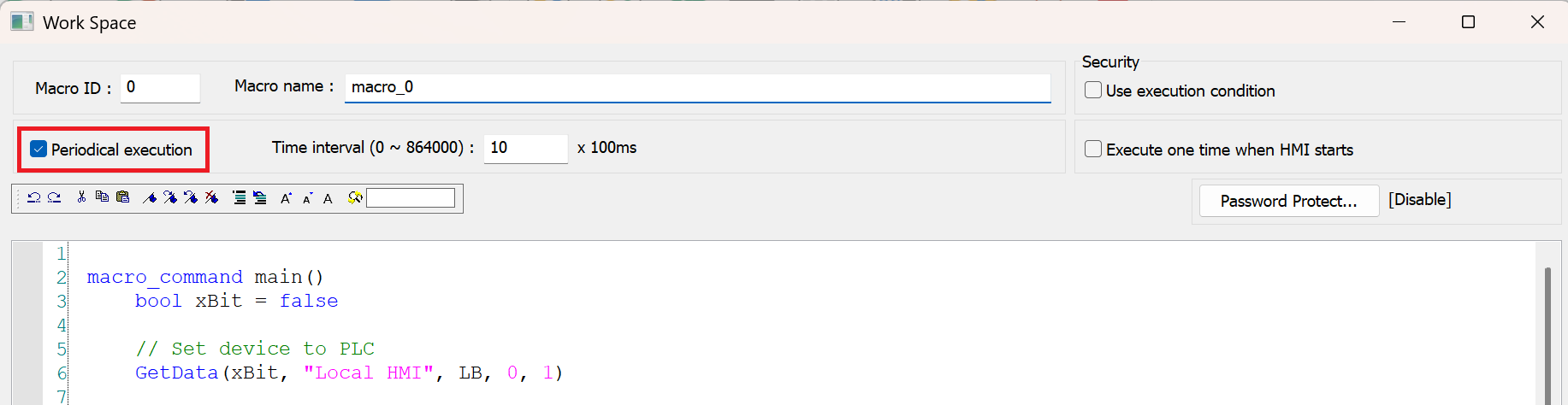
Here is an example of how you can test this. Please ensure that Periodical execution is checked at the top of the macro to simulate the HMI heartbeat.
macro_command main()
	bool xBit = false

	// Set device to PLC
	GetData(xBit, "Local HMI", LB, 0, 1)

	// Toggle the bit value
	if xBit == false then
		xBit = true
	else
		xBit = false
	end if

	// Write back to LB-0
	SetData(xBit, "Local HMI", LB, 0, 1)
end macro_command