- HMI Model: MY8072iP
- EasyBuilder Pro Version: V6.10.02.231
I frequently get the “Device No Response” pop-up - probably about every minute or so and then it disappears after about 3 secs without any intervention.
What causes this and can I do anything to stop it?
I presume the “device” being referred to is my controller - which is connected via BACnet/IP.
The controller also has several Modbus RTU devices connected - the data is transferred to the HMI for display.
Hi @BrianF_NZ ,
Does the “Device No Response” pop-up appear on a specific window, or does it occur throughout the entire project?
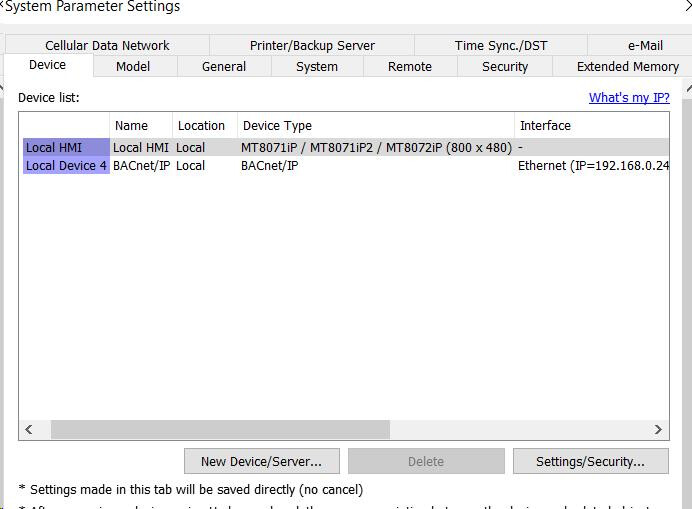
Additionally, could you please provide a screenshot of the device list within System Parameters? This will help us further determine the cause of the pop-up.
Hi,
The “Device No Response” pop-up has appeared on all 8 screens in my project .
If I react fast enough I can change the displayed screen while the pop-up remains present.
Attached below is a screenshot of the Device list - pretty simple!
You will notice that the HMI is connected to Local Device 4. In the past I have had trouble with the BACnet device becoming detached (see earlier post) - I expect the no4 means this is the 4th time I have attached/reattached the (same) device.
Detachments have occurred during tag updating
Thank you
Hi @BrianF_NZ ,
Thank you for the additional information. Since the “Device No Response” pop-up appears across all screens, it could suggest the issue may be related to the communication settings or a background process within the project.
To help us investigate further, could you please provide a screenshot of the BACnet/IP driver settings for your device?
Additionally, we recommend the following troubleshooting step to isolate the cause:
- Create a copy of your current project
- In the copied project, please remove all data sampling, alarms, macros, data transfers, condition objects, PLC control objects, and schedulers.
- Download the modified project to the HMI and observe whether the “Device No Response” error still occurs
This process will help determine if the issue is caused by a background task or related to the communication configuration. Please let us know the results and we will continue troubleshooting!
I will work on your solution and get back to you in a few days.
I would like to ask about a highly pragmatic solution. Since the pop-up disappears without any intervention after about 3 seconds - it seems that the device does respond but it takes a little longer than the HMI allows before triggering the pop-up. Would it be possible to adjust an HMI setting so that it allows a few seconds longer for the device response to arrive?
None of the data presented on screen seems to be affected by the “device no response” condition.
Hi @BrianF_NZ ,
In the majority of cases, the “Device No Response” message is due to a communication error with a tag or register assigned to an external device. We recommend starting with the previously suggested troubleshooting method, as the EasyDiagnoser application does not seem to be compatible with BACnet/IP tags.
If the issue is not resolved or identified using that method, you may try increasing the “Turn around delay” to a value between 10-20ms. If the issue persists, please revert this setting back to 0, and instead increase the timeout to a value between 3-5 seconds.