To explain the Toplogy, I have a Gateway, M50 ( MODBUS TCP/IP Device), and the meters must have different station ID’s. The devices I am connecting are the DIRIS Digiware I-61, about 30 of them.
Is it possible for me to read the registers from the M50 with the same IP, but also access the same register on devices with multiple different Station ID’s? For instance, if my IP for the M50 were 192.168.100.1, and I need to read I1 from Station ID 13, can I do that? If so, how would I set this up in EBPRO?
Good afternoon! Provided that the IP belongs to a Modbus TCP gateway. The Modbus TCP/IP M50 gateway and the DIRIS Digiware I-6I meters are “behind” it, each with a different Station ID (Unit ID). In this scenario, the IP identifies the gateway and the Station ID defines which internal device will be accessed. In EasyBuilder Pro, the configuration is simple: Use the Modbus TCP/IP driver Create a device for each Station ID, maintaining: Same IP (e.g., 192.168.100.1) Different Station Number (1, 2, 13, …) Example: IP: 192.168.100.1, Station Number: 1 IP: 192.168.100.1, Station Number: 13 The registration addresses can be the same because what differentiates which meter responds is the Station ID, not the IP.
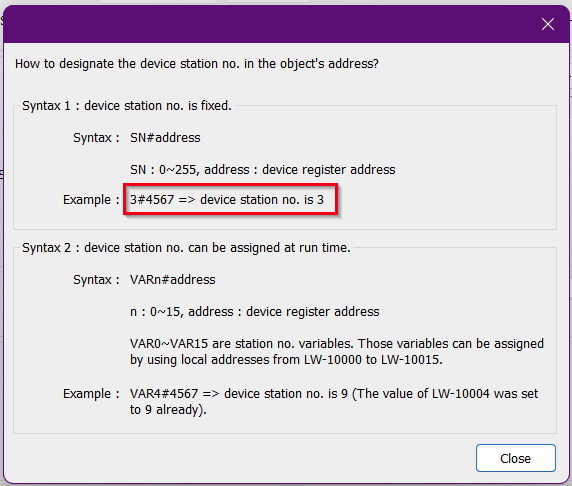
Adding on to @eddy_neves, below is the syntax to access device stations within the Modbus TCP/IP driver. This syntax will be used if the M50 does not provide address mapping to the devices.
Please let us know if you have any other questions.
On my project I was able to successfully establish a communication with my Socomec Devices, but now I am running into another issue– how exactly am I to cast the data into a numeric? For this example, I have a U-30 Module, with Slave ID 30, on a Socomec device and need to read Voltage Information. I have the following table:
36999
0x9087
2
Frequency
mHz
U32
37001
0x9089
2
Ph‑N Voltage : V1
V 10⁻²
U32
37003
0x908B
2
Ph‑N Voltage : V2
V 10⁻²
U32
37005
0x908D
2
Ph‑N Voltage : V3
V 10⁻²
U32
37007
0x908F
2
Ph‑N Voltage : Vn
V 10⁻²
U32
The issue I am currently facing is the issue of the *** that appears in the numeric object when I High Potential the device I am using. As far as I know there is a casting issue but am stuck from there. Thanks,
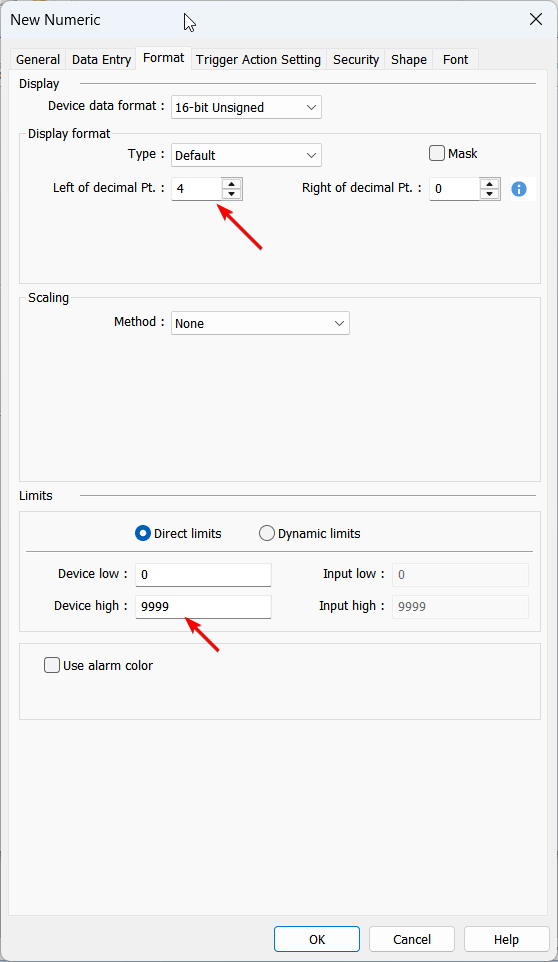
When the numeric object displays ****, this means that the value is to large to be displayed by the number of digits the object will display. To fix this, please increase the number of digits and set an appropriate “Device high” within the “Format” tab: