- HMI Model: cMT3072XP
- EasyBuilder Pro Version: 06.10.02.231
I have a Maple HMI cMT3072XP that is being used for data sampling and recording through 10 serial connections. The issue is, all 10 connections will not be used all the time, and there will be times when one or more connections need to be disconnected.
My issue is that when there is one or more disconnected probes, a “Device No Response” popup appears on my screen, and will not go away until the user manually dismisses it. This popup will reappear after a few seconds for the duration the probe is disconnected.
I have alarms for data ranges bound to toggle switches that allow me to “turn off” the alarms when a probe is purposefully disconnected, but I am unsure how to either turn off the “Device No Response “popup, or tie it to these toggle switches like the rest of the alarms.
Hi @jdenman ,
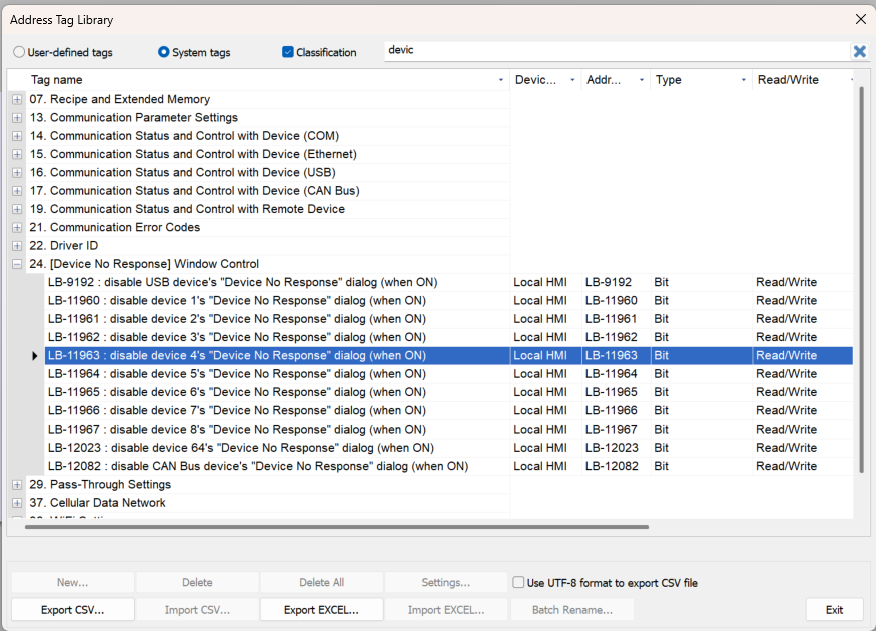
Thank you for your question. We don’t normally recommend turning off the “Device No Response” pop-up, but for this application, you could use a system tag that disables the device’s “Device No Response” dialog when the tag is ON, and then toggle the tag ON/OFF as needed.
Within the Address Tag Library, select System tags, and locate the “Device No Response” tag that corresponds to the device prompting the pop-up message.
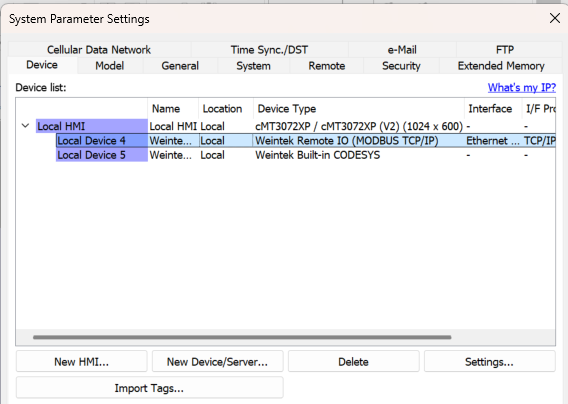
The device number can be found in the Device list within System Parameter Settings.
Additionally, when building applications with a variable number of devices (where some devices may be disconnected), it is recommended to include methods to disable polling from inactive devices. Features such as “Hold Control” in Data Sampling, Direct Windows for UI objects, and “Enable / Disable” registers within alarms can prevent unnecessary polling and communication errors from disconnected devices.
Hello,
Thanks for responding. I located the address causing the popup and tied it to a toggle switch, and it successfully solved my issue. I did make an alarm in the case that the system stops reading data from a probe that is purposefully connected in the case that something breaks. The reason I had so much trouble doing this I now realize is due to all ten connections being under one device, instead of multiple.
Thanks!