- HMI Model: MT8072iP
- EasyBuilder Pro Version: latest
I need an operator to make some selections - in one case pick 1 of a possible 2 (eg Lead or Lag) and the other (eg Mode 1 / Off/ Mode 2). The selections to be sent as bits to PLC for action.
Using old-fashioned physical switches, I would use a 2-pole, 2 or 3 position selector switch. The exclusive-OR function is achieved by the mechanism - the switch can only be in 1 position at any time.
As a beginner to EasyBuilder, I dont know what my options are to achieve this with my HMI.
Various computer applications - including EB Pro - require a single choice between limited options. Often this is done with Radio-style buttons where only 1 button can be selected. Selecting 1 button “unselects” any other buttons selected. (The on-screen equivalent to old-fashioned piano-key switches.)
I found a brief forum post ( How to replicate 'radio button' functionality on the HMI - #3 by EngIndSys ) about setting up radio buttons using a Combo Button. However I am not sure this is applicable to my iP model. The User Manual doesnt list iP for the Combo button, although the option is available when I click it.
I do not understand how to use the 4 actions available (Delay, Set Bit, Set Word, Change Window) to achieve what I need.
Would you please give me some tips how to start - or perhaps there is a post on this.
I have also tried a multistate switch using a 3-state selector switch picture. The MSS tag selection shows DINT data type - see screenshot
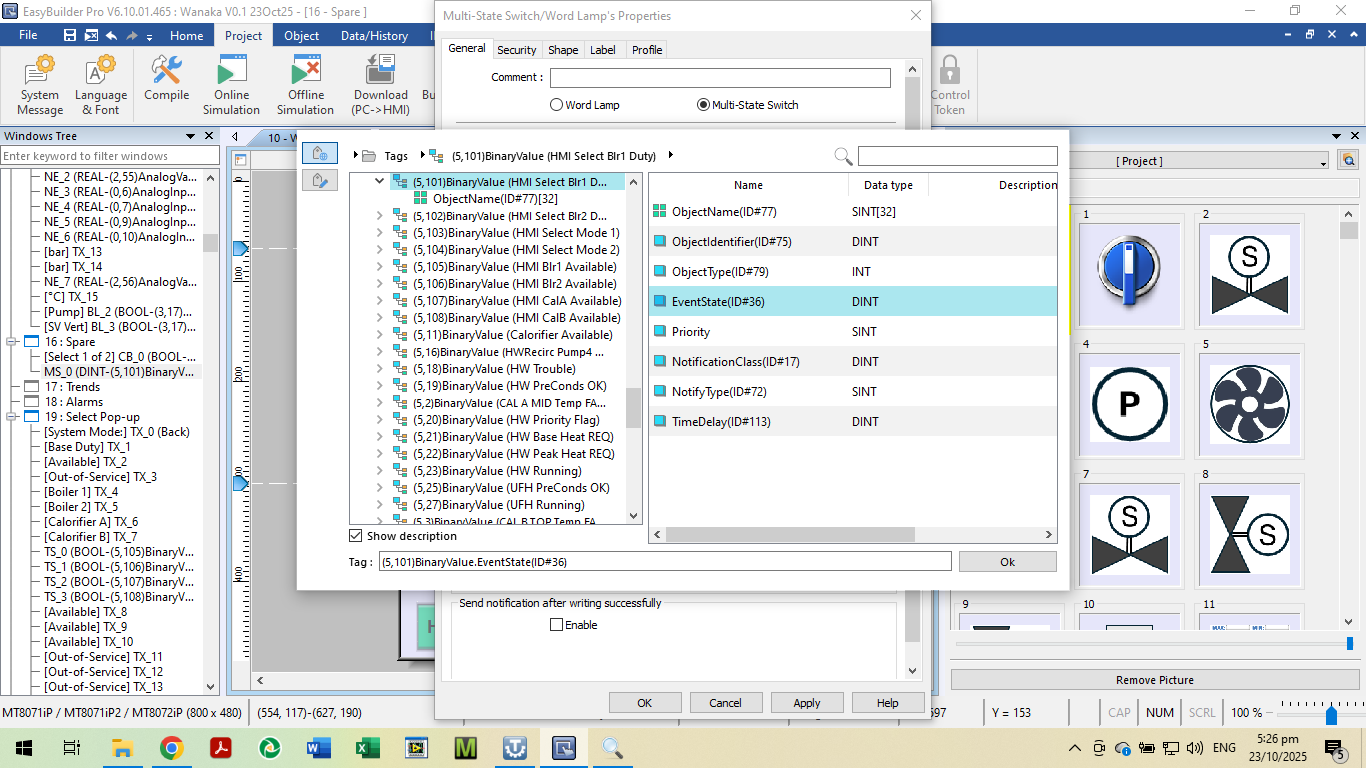
The data to PLC needs to be either of 2 different bits.