I’m trying to get system time using SysTimeRTCHighResGet function from SysTimeRTC library, but getting 0 returned. How do I get local time, that I can use in the program?
How to access system time within Weintek Codesys
none
0.0
0
To get the local time in your program, we recommend using the following approach:
- Use SysTimeRtcGet to retrieve the system time in DWORD format.
- Then, convert this DWORD system time to a readable date and time format (year, month, day, hour, minute, second, microsecond) using SysTimeRtcConvertUtcToDate.
- If you need to convert a date and time structure back to DWORD format, use SysTimeRtcConvertDateToUtc
For more information on HMI system times here is a resource:Demo Project
Thank you. It works with SysTimeRtcGet function.
1 Like
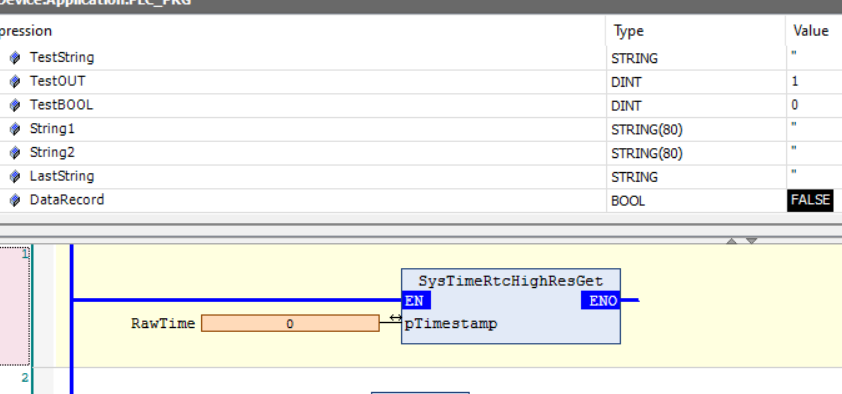
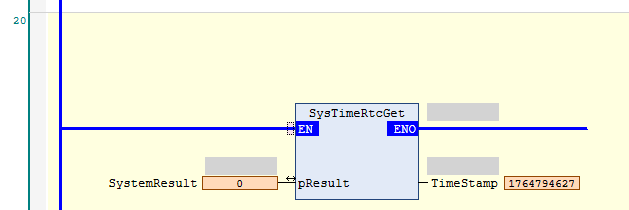
I am having the same issue as the SysTimeRtcGet is just retreiving a 0. I have tried HighRes as well and get the same result. Any ideas?
Thanks
Hi @vick32w ,
Could you send us screen shot of your project so we can take a look at your set up and see if we can spot the issue.
Thank you!
This works for me
VAR
SystemResult : UDINT;
TimeStamp : UDINT;
END_VAR
// Get CPU Timestamp
TimeStamp := SysTimeRtc.SysTimeRtcGet(SystemResult);
Here is a screenshot of it offline
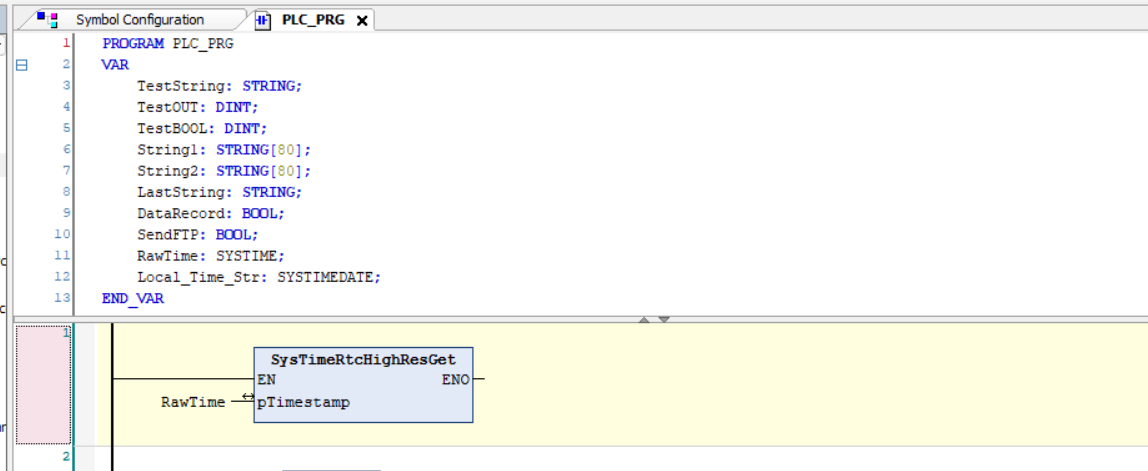
Here is a screenshot online
Also tried the SysTimeRtcGet with the result being a UDINT instead of a DINT and still returned a 0.
Thank you,
The video I watched did not have anything on the right side of the function. I really appreciate it.
Have a great rest of your day.
1 Like