- HMI Model: MT8072iP
- EasyBuilder Pro Version: 6.10.01.510
I am getting some energy values from the smart logger in the HMI via the register address. The issue is that the values are in kWh, and I want to convert them to MWh. What are the possible options for converting units from kWh to MWh and from MWh to GWh?
One solution might be to write a macro for it. Are there any other possible ways, e.g., to use interpolation for it?
Any guidance will be appreciated.
Regards
Hi @mohsin160 ,
To convert units we would recommend macros. Something like the one below should do the job. Please ensure the data types are matched up on the numeric objects to ensure consistency across the logger, macro, and object.
macro_command main()

// Declare variables
float kWh, MWh, GWh

// Read kWh value from device register (example: LW100)
GetData(kWh, "Local HMI", LW, 0, 1)
// Convert kWh to MWh
MWh = kWh / 1000.0

// Convert kWh directly to GWh
GWh = kWh / 1000000.0

// Write data
SetData(MWh, "Local HMI", LW, 110, 1)
SetData(GWh, "Local HMI", LW, 120, 1)

end macro_command
Hi,
Thanks a lot for the reply. Is there any alternate way to achieve the same like by using interpolation?
If not then using macro is good to go for me.
Thanks & Regards
@mohsin160,
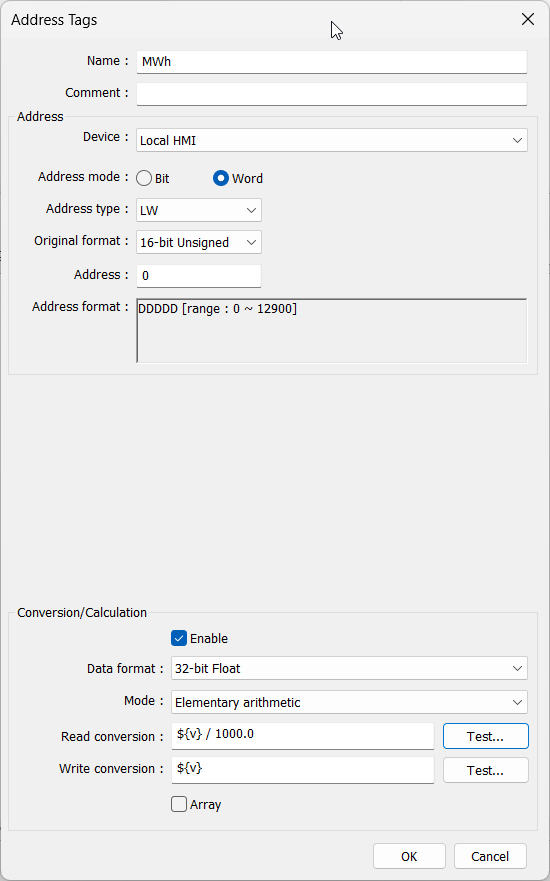
In some cases, you can also create a simple tag as shown in this video and use the “Elementary arithmetic” feature to perform the conversion: Link
Thanks a lot for the details.
I used the same and somehow wasn’t using the correct data type.
Anyway, it’s working now.
Thanks.
Hello,
Apart from the solution tagged, can you guide or give an example of what interpolation is used for and how it can be used in measured values?
Take the example for the same converting energy from kW to MW and GW?
Regards
Hi @mohsin160,
For more information and examples about interpolation, please check out our EasyBuilder Pro manual, Section 13-55. It includes multiple examples of interpolation.
Easy Builder Pro Manual