- cMT 13162X
- EasyBuilder Pro Version: 6.10.01.422
- I have the “Device No Response” message on certain screens. Is there a way to see which tag is causing this?
How to find what tag is causing the "Device No Response."
none
0.0
0
Hi @rday1971,
I usually recommend using the cMT Diagnoser to determine what tags are marked as “polling”. A tag with a value of polling cannot retrieve a value from the PLC and is often the cause of the “Device no response” message. Here is a link to a video in which we demonstrate how to use the cMT Diagnoser: Link
Hello Brendon,
I the only thing i can see that displays “polling” is a reference to Window 5:
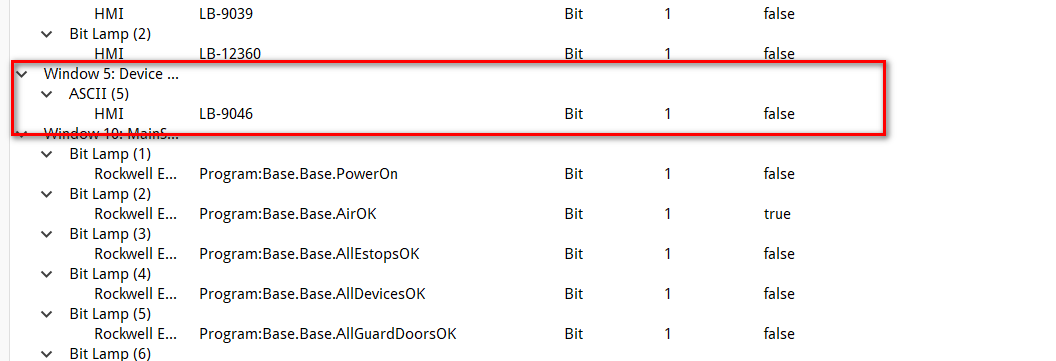
It will come and go.
Hi @rday1971,
Thank you for the update, if there is not obvious “polling” tag and if the issue only occurs on certain screens, I would recommend that you review the recommendations in this troubleshooting tutorial: Link
I would like to send you my Easy Builder project as well as my .ACD file and see if you can replicate this Issue. I removed all objects from the main screen and still have this issue.
The CMT Diagnoser seems to reference a object on Window 5 which is the “Device No Response” Popup. I’m not sure what ASCII (5) is and I do not know how to search for it.
Hi @rday1971,
To have our team evaluate your project, can you please send an email to support@weintekusa.com with the HMI project file as well as the HMI’s serial number? In addition, please include a link to this post as a reference. I will be able to see email come through after a ticket is assigned. The ticket is assigned using the serial number, so please be sure to include this information as well.