- HMI Model: cMT3162X and cMTt3102X
- EasyBuilder Pro Version: 6.10.01.510 Build 2025.10.22
How to rotate an indicator 360 degrees for crank position display using a CompactLogix PLC tag
How to rotate an indicator 360 degrees for crank position display using a CompactLogix PLC tag
You can do this with the Moving / Rotating Shape object – it’s designed to rotate a graphic based on a register value. Navigate to the “Object” tab and select the “Animation” icon, you will find the “Moving/Rotating Shape” option:
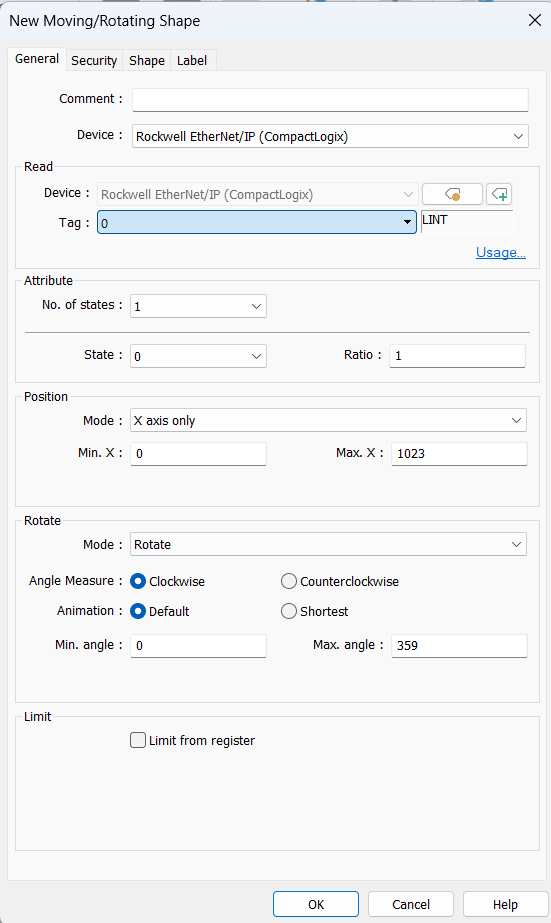
In the object’s General tab, set the Read address to your CompactLogix tag:
Next you simply choose a Rotation Mode based on what your CompactLogix tag represents — if your tag already provides a 0–360° value, select Rotate and set the min/max angles to 0 and 360 so the needle follows the tag directly; but if your PLC tag is in another range, select Rotate w/ scaling so EBPro applies a scaling formula to convert that input range into a full 0–360° rotation.