- HMI Model: mt8106iP
- EasyBuilder Pro Version: 6.10.2.300
- OMRON Nx Series
The recipe transfer tab is not in the recipe database menu. How do I transfer it to a PLC? I tried using macros but it’s not very ergonomic and scalable as I have to change the macro everytime I change the field.
Hi @janTatesa ,
Thank you for your question! Legacy models such as the MT8106iP were released before the Recipe Transfer feature was developed. Due to runtime and compilation differences on these older HMIs, the built-in Recipe Transfer functionality is not supported.
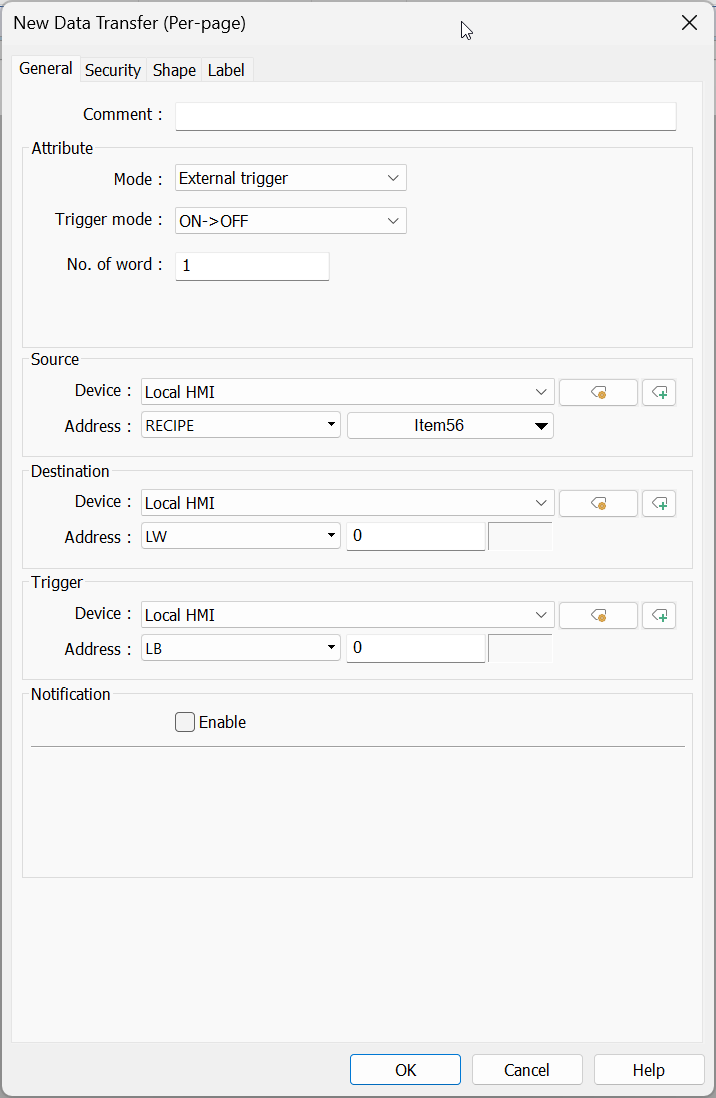
As an alternative to using macros, one solution would be to use multiple “Data Transfer (Per-page)” objects configured with an “External Trigger.” These objects automatically update if you change the name of a recipe field, which helps reduce maintenance effort compared to editing macros each time the recipe structure changes.
If additional recipe fields are added later, you can simply copy an existing Data Transfer object and reconfigure only the transfer destination addresses. All of the Data Transfer objects can share the same external trigger address (for example, an HMI local bit), allowing all recipe values to be transferred simultaneously using a single “Set Bit” button.
This approach is typically easier to maintain and scale than a fully macro-based solution. Would this approach work for your project?