Currently I need help since I’m not really that knowledgeable in Weintek HMI Recipes and Codesys.
Currently, I want to use the recipe values from the Weintek HMI that are send to the Codesys software. Whenever an operator changes the PIN number found on the HMI, it should then transfer the values of the recipe table into the Codesys software.
Version of Codesys that I’m using is Codesys V3.5 SP10 Patch 3 (I’m not allowed to upgrade due to issues)
Is there any efficient methods to be used to get the recipe values transferred and read from the Weintek HMI to the codesys software?
Thank you for your patience. Here is the LINK to our recipe database basic video. This should walk you through ways we transfer data in and out of our recipe database using control objects.
The issue I’m facing is that I’m connecting a CODESYS V3 (Ethernet) as a device. I imported my tags from the codesys software as an XML file. After the operators selects the correct pin number from the recipe database list, then I’m hoping to fill out information that comes from the recipe database like company name and gallons in both hmi and that information to be sent to codesys.
Then I follow the steps in the video in order to create the recipe database creating a similar structure. However, I’m not sure how to create the register for the PLC that is mentioned there to see what values are actually sent from the recipe table. The video skips over it.
After following other steps even in the simulation, I press the pin number and I don’t get any information like of gallons or company name in the HMI screen. It just generates a random letter like “p” or something like that.
Is there any other video or links I can look into to find any information about this? Or any way to check where mistakes could be happening? Would a trigger action setting be needed to be created?
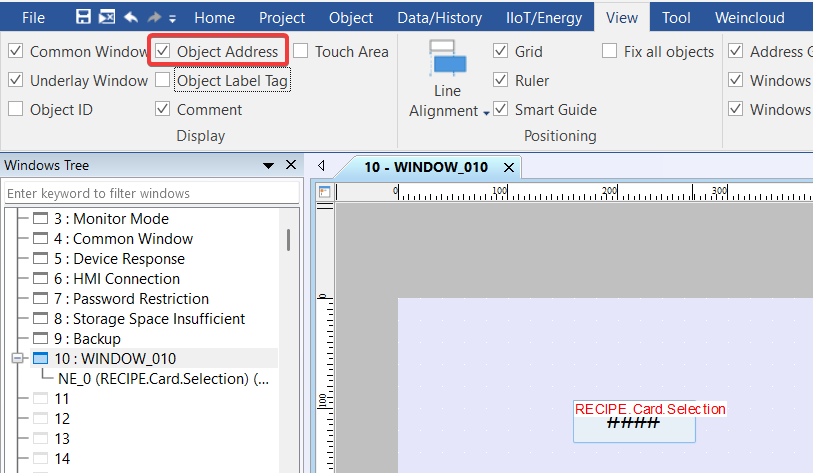
Just so that I can get an idea of your current setup, can you please post a screenshot of this project window? Before taking this screenshot, can you please enable “Object Address” in the view tab?
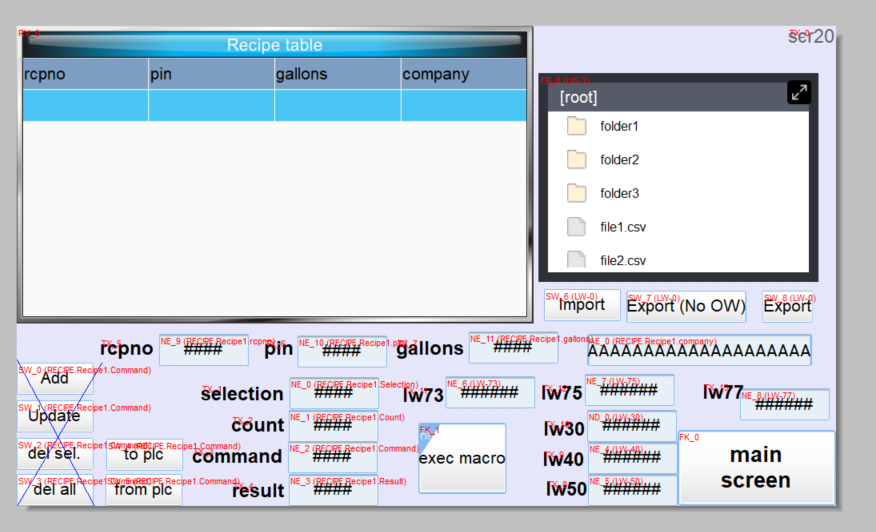
Also, can you please post a screenshot of the objects in the video that you would like to know how to create so that we can provide some step-by-step instructions?
So I realized that the issue that I was having at first was related to the codesys program having an issue with the memory addresses. I was able to fix it and currently whenever I press the button “to plc” and “from plc”, I’m able to get the values from the recipe database.
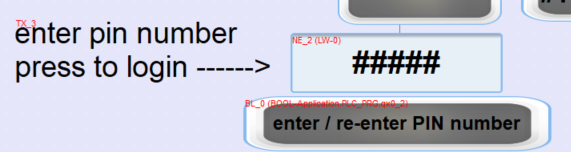
However, the goal that we want to achieve is to have the operator be able to write the pin number from screen in the first screenshot “enter pin number press to login”
Would it be neccesary to connect the buttons of the “to plc” or what would be needed to do to be able to write the pin number in the first screen so that it recognizes the number from the recipe database? Then I will use that pin number to be sent to the codesys software.
It looks like you have a pin number in the recipe as well, do you want to store the pin number from the first screenshot within the local recipe as well or do you want to just write this to the PLC?
So the goal that we have is to let the anyone write the pin number in the first screenshot (I have it setup that a keyboard shows up pressing LW-0), then compare it to the one in the recipe table that it matches and then move the values of gallons from the recipe table to the codesys program.
Not sure if this is possible like this or I need to create a macro for connection between the recipe table and the hmi addresses.
So, I was able to work on the macro setup using the link that you sent. However as i was reading it from what the post mentions in the following “This method is suitable for those that wish to provide machine operators with an efficient method for searching through recipe records. It is not suitable for situations in which it is necessary to search a specific column, validate entry, or as a means to retrieve, process, and distribute returned results.” so that means that it is not possible to use that method to get the data back from the plc into the recipe database?
Also, I’m still not able to send the correct data to the codesys. It is sending some random numbers the moment i press on the exec macro button and doesn’t consider the pin number even though i linked both macro and hmi button.
There are two sections within that post, the first is labeled simple as it is the easiest way to implement searching. However, the “simple” method is not suitable for your application. Instead, you should review the instructions related to the “advanced” method shown here: Link
By using this method you can:
Use a GetData function to read a pin typed by the user.
Use a recipe query statement to compare it to pins within the database
Find the related pin and get the value of gallons in the same row
Use a SetData to transfer the value in gallons to the CODEYS program
Here is some example code:
macro_command main()
	char sql[100] = "SELECT * FROM Recipe1 WHERE pin = "
	char cPin[4] = {0,0,0,0}
    short sPin = 0

    // Get pin data
	GetData(sPin, "Local HMI", LW, 0, 1)
	DEC2ASCII(sPin, cPin[0], 4)

    // Form query
	StringCat(cPin[0], sql[0])

	short n_records = 0

	RecipeQuery(sql[0], n_records)

	if n_records > 0 then
		short recordID = 0, i = 0
		short gallons = 0

		for i = 0 to n_records
			RecipeQueryGetRecordID(recordID, i)
			RecipeGetData(gallons[0], "Recipe1.gallons", recordID)

			SetData(gallons, "CODESYS V3 (Ethernet)", "PRG.gallons", 1)
		next
	end if
end macro_command
I worked on making usage of the link that you sent for the code. I tried to use the code that you sent and then made modifications to it.
However, I wanted to ask if the macro functionality should work for any version of the Codesys Software? Currently I need to use the Codesys V3.5 SP10 Patch 3 and I’m starting to think that the version might be the problem and I can’t change the version of codesys
Currently after going to the online/offline simulation button in the macro, I can see how the code is running but giving me 0. Even after putting a specific value in the macro just to run like for example “2001”, once that it goes to “GetData” function it all becomes 0 even after trying to also type any digit.
Can you please let me know if there is any other function possible? Or it has to be different because I’m currently using Weintek Built-In Codesys for the project device or that should not matter?
I would recommend that you use our diagnostic tool, cMT diagnoser to step through your macro using break points and watch variables. Here is a tutorial: Link. This should help you identify the issue. As for our macro’s compatibility with CODESYS, there should be no compatibility issues with 3.5.10.30.