I’m having very strange Modbus (ASCII) communications problems related to the MT8103iE device and its RS232 port.
The remote (Modbus Slave) device is a rather old design, so it does not support RTU, only the ASCII mode.
Anyway, the problem happens using the actual MT8103iE device and its Con B (9-pin DSUB Male) port.
I’m quite certain that the project settings and connection cable are OK, because the the Online Simulation from EB Pro software works great!
But as soon as I download the very same project into the MT8103iE HMI device and move the connection cable, the problem happens:
The HMI cannot show any data from the Modbus Slave device.
2. I also tried to connect the same HMI display device to a test PC (using a 5-pin and 3-pin Nullmodem cables). The PC runs a Modbus Slave simulation
software and have some simulation numbers entered into its Input/Holding Registered (accessible via Modbus Functions 3x and 4x).
The HMI and PC communication worked just fined
3. I also did connect the HMI’s RS232 port to my Modbus Slave device via a PC using 2 cables and Serial Port Redirection (Mirroring) software.
The HMI could display all data from the PC without problems…
BUT regardless of these 2 tests, the DIRECT RS232 communication between the HMI and MB Slave device does not work.
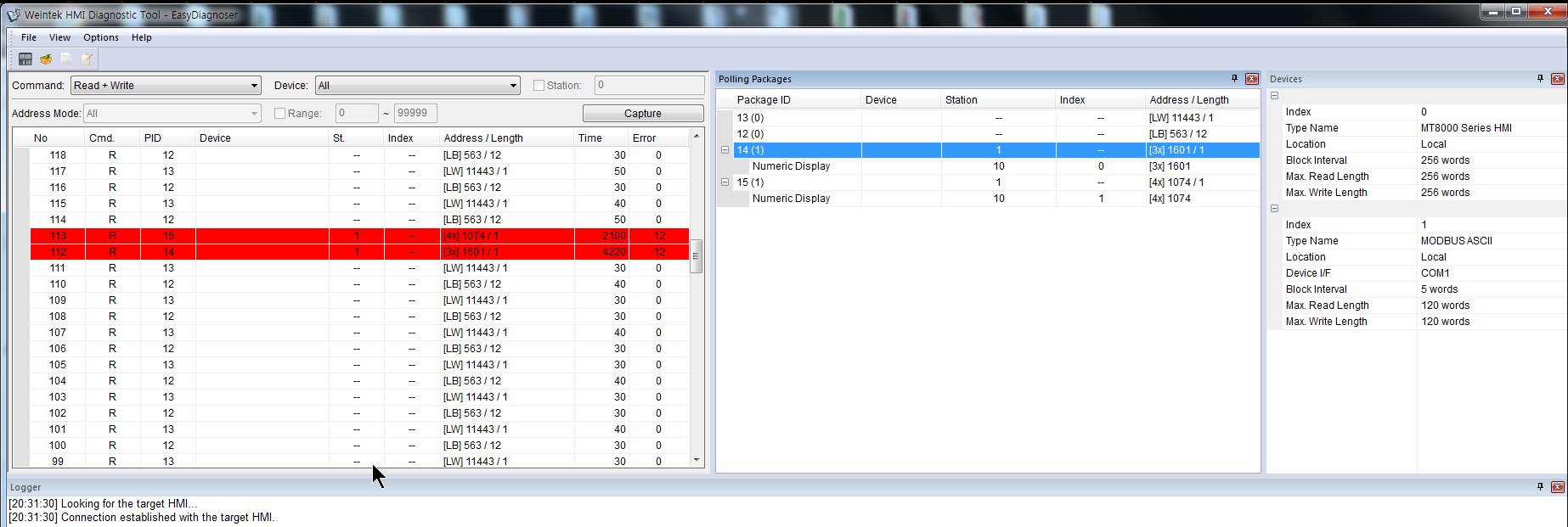
[For some reason I was not able to embed a screenshot from the EasyDiagnoser program showing the “Error 12” into the message]
Anyway, I would greatly appreciate if someone let me know some ideas regarding
What could be wrong and What can I do about that?
Please help me out!
Thank you and Best Regards,
s4gia
PS. Do you think upgrading to the latest 6.10.x version would help?
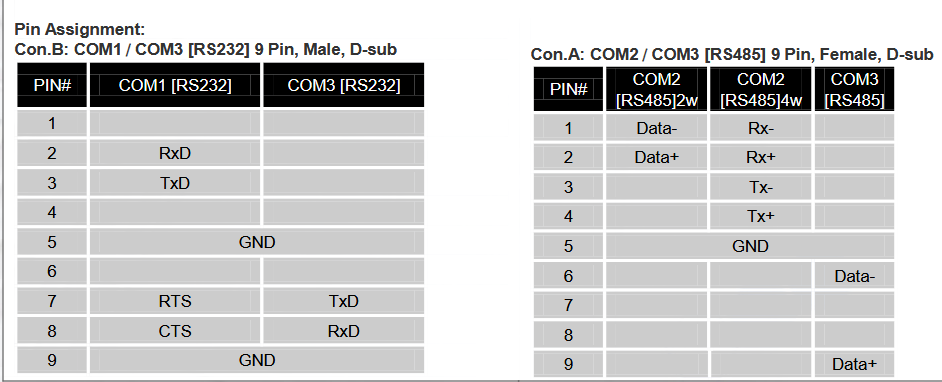
We recommend using solderless DB9 adapter on both sides to quickly determine if there is an issue with the pinout. Below is the pin assignment if needed.
We also have made some updates on our end could you please try uploading the screen shots of the error codes. If possible, could you also upload images of your device set up within the system parameters of your projects.
Thank you for your reply. A quick follow up question:
Are RTS and CTS pins utilized in anyway on RS232 COM1 when the Modbus ASCII driver is used?
Also, I did try swapping TXD and RXD pins, but it only made the situation worse. So, I believe that my cable pinout is OK because it works with a COM port of my laptop (both built-in on the mainboard and external USB adapter, based on FTDI chipset).
BTW, Is there a way to attach a ZIP file with a project here to the post?
Or should I use a link to DropBox/GoogleDrive or similar file sharing service?
Is there any way to see the actual raw bytes sent and received via the RS232 port, preferably with timestamps?
Also, can I have some more info about the “Error 12” (Ignore) shown in the EasyDiagnoser?
Is it related to the Incoming (RX) or Outgoing (TX) data?
What kind of things might be causing it and what can be done to get rid of it?
Just in case it helps, here is the link on a GoogleDrive containing a simple project that I use for testing: MBA_test01 project
Please check and let me know the answers to the above questions…