HMI: cMT2108X2 / MT8100iE
PLC: Omron CJ/CS Series
Is there a way set a bit or flag in the PLC, for each time a button is pressed ?
Or read the “screen saver timer” to check how long my HMI is idle.
The hard way to do this would be a toggle switch on every window without frame or label and paste the current information over this (momentary) toggle switch.
There should be an easier way to check activity on the HMI.
Rene
Hi @renevandijk ,
Thank you for your question! Could you share a little more about your overall goal with this application?
There is also a system register, LW-9041, that indicates the touch status of the screen, which may be useful for your application.
Thank you Arden.
If there is no human interaction, I want to switch back to an information screen (a production counter).
I do not want to use the screen saver option because if there is no interaction and no new counts, I still want the screen to turn off.
P.S. I use an alarm flag to wake the screen up on each counting pulse.
Is there a way to read the LW-9041 info from the PLC ?
Rene
Hi @renevandijk ,
Thank you for the clarification!
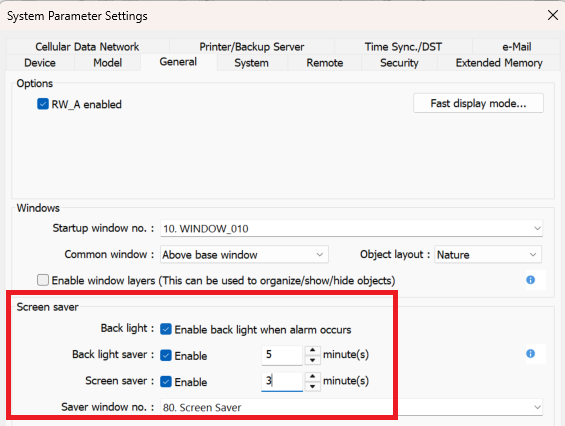
One option is to use both the screen saver and backlight saver options. The screen saver switches to a designated saver window, while the backlight saver turns off the backlight LED, causing the screen to go dark.
For your application, you could configure the screen saver to trigger first and switch to a production counter window. Then, after a longer period of inactivity, the backlight saver could trigger and turn the screen off. These settings can be configured under System Parameters > General:
Alternatively, if you would prefer not to use the screen saver, you could use a PLC Control object to change the window based on the value/status of LW-9041.
To read the LW-9041 value from the PLC, we recommend using a Data Transfer object to copy the value of LW-9041 from the HMI to a PLC register.
Would either of these approaches work for your application?
Thank you Arden,
I did have to go with the "screen saver and “blacklight” option.
After professor Google helped me figure out how to get the LW-9041 info to the PLC.
My problem with my customers older HMI (the MT8100iE) the activity bit (LW-9041), stays on in some occasions.
I noticed on this older model bit LW-9041 stays on after a “Numeric input” has been changed in value.
Anyway, the trick with using both the screen saver and blacklight saver works for me.
Thank you.
Arden,
Where can I find a list of all LW-Words and LW-Bits ?
Hi @renevandijk ,
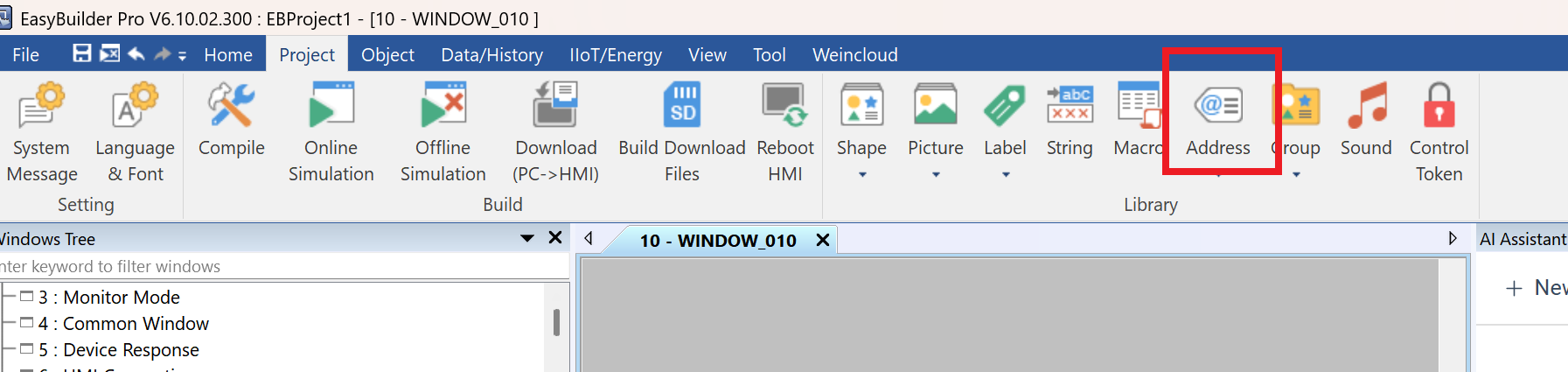
The Address Tag Library in the Project tab provides a full list of system tags available within EasyBuilder Pro.
You can also find a complete list of system registers in Chapter 22 of the EasyBuilder Pro manual. Here is the link for your reference: System Registers.
Alternatively, if you are looking for the LW addresses you created throughout your project, you can find them in the Address grid, which can be enabled from the View tab.