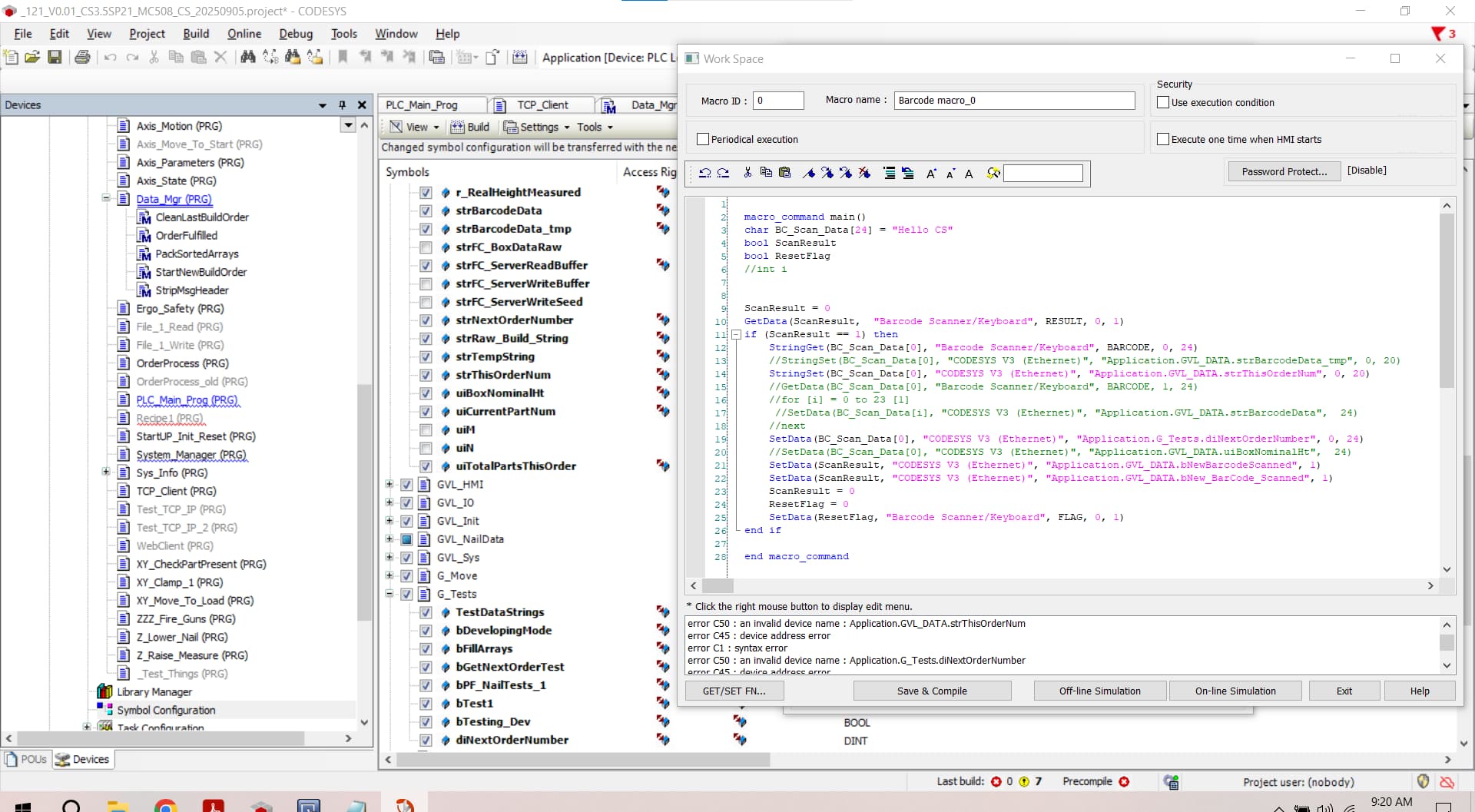
If the SetData function is only transferring one value, the data count attribute may be set to its default value of one. Could you confirm that this value is set to the proper amount?
Below, the data count is the last argument of one: SetData(var[0], "Local HMI", LW, 100, 1)
If this doesn’t resolve your issue, could you send us images or code of your macro so we can further diagnose the problem?
The error is occurring due to a syntax error, as it looks like you have an extra argument in there which is causing the issue. We recommend you use the GET/SET FN… tool in the bottom-left corner of the macro window. You can use this tool to write out your macro.
Below is a video to help you use this tool. Macro Video
Please let us know if you have any other questions!
I’m trying different way s of getting a 6 digit number into th PLC.
I can use stringset() to transfer one digit. If I change the starting point var[1] to var[3] then the single char I receive in strMy_PLC_Var :STRING(24) := ‘ ‘; changes from ‘3’ to ‘7’ or whatever digit is stored in the Weintek array. Yes- I see one char in the PLC.
The code is simple and clean (Other than the trial commands I commented out)
You can certainly concatenate these characters, however, the issue that you’ve described is not normal. Can you please advise the full EasyBuilder Pro version, CODESYS IDE version, and CODESYS runtime for our reference so that we can try to replicate this issue in office?