EasyBuilder Pro Version: 6.10.01.422 Build 2025.07.01
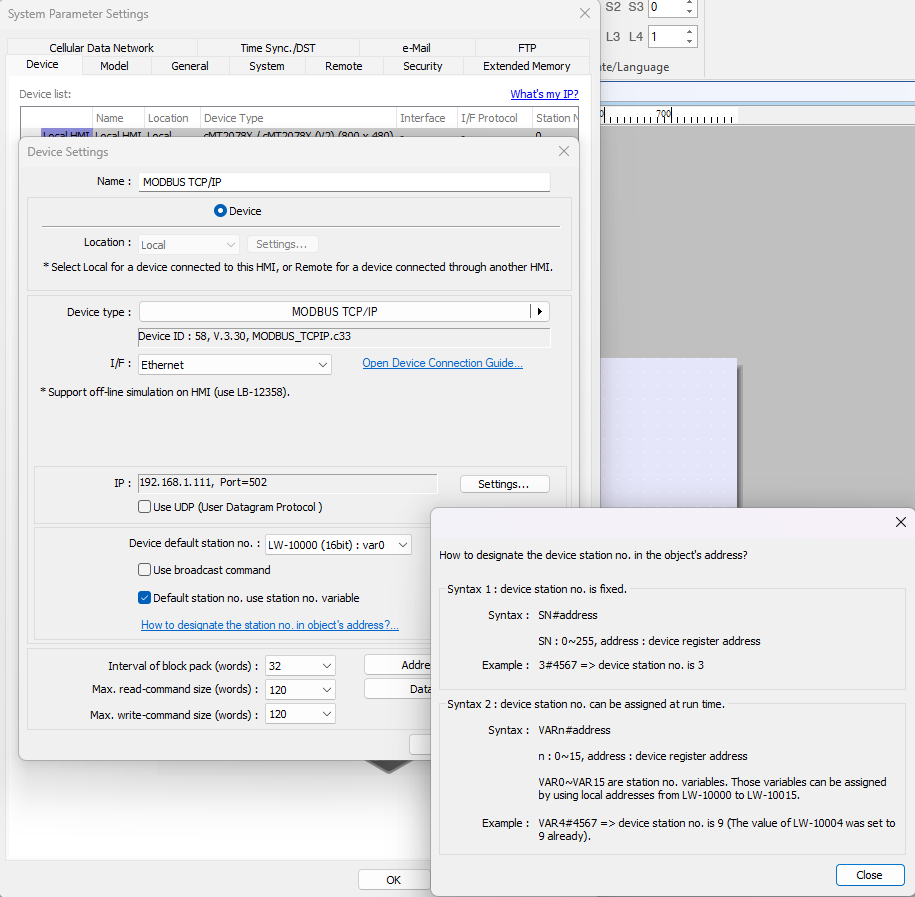
How to add multiple Modbus device with different Station (Modbus ID) but has the same IP and Port? I have around 16-20 modbus device (PV Inverter) connected to SmartLogger, and each device has different ID, but has the same IP because I only can read the device through SmartLogger.
I assume SmartLogger is a product from Huawei. If so, in the USA we barely have customers using products from Huawei.
In your case, a single Modbus TCP/IP driver can be used to talk to your Modbus devices with different station IDs through the SmartLogger adapter. However, in my opinion the driver may not be suitable to talk to the Modbus devices at the same time.
Yes, it is a product from Huawei.
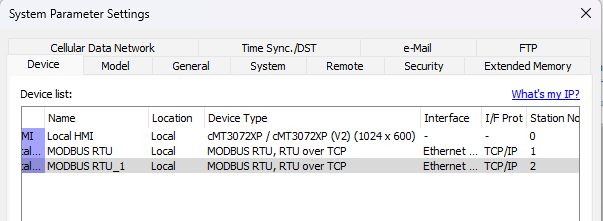
I have another case, I have a few modbus device connected with daisy chain (RS485), which connected to Moxa NPort 5150 (for converting from Serial to TCP). I have tried to add the device with Modbos RTU over TCP. But it still give the same problem, which I cannot add the device under 1 IP Address
Regarding your other case, the configuration in EBpro may be similar to this image. However, you had better contact your local distributor for technical consultation case by case if you still have some difficulties.
For your reference, if a vendor uses the term “Modbus TCP”, it is likely that the device supports the standard Modbus TCP protocol rather than Modbus RTU over TCP, while other device variants would use terms such as “Modbus over Ethernet”, “Modbus Ethernet”, or “Modbus over TCP”, which implies that you should read the device user manual for further information.
RTU over TCP is not a reliable protocol. You would use a Modbus gateway that actually converts Modbus RTU to Modbus TCP. The frame structure of Modbus RTU und Modbus TCP are different.
Thank you for your assistance.
The SmartLogger includes a Modbus Mapping Table for connected devices; however, some data is not available through this table. In such cases, we can directly access the device’s Modbus table by connecting to the SmartLogger’s IP address and using the Modbus IDs assigned by the SmartLogger (e.g., SmartLogger ID = 247, Power Meter ID = 51).
I also previously provided incorrect information — it turns out that what cannot be the same is the TCP port. Therefore, if I want to add multiple devices with the same IP address, I need to enable additional ports. For example, Modbus TCP defaults to port 502, but I can enable port 503 and so on, according to the number of devices required.