Search data in recipe based on user input

Search data in recipe based on user input https://forum.weintekusa.com/uploads/db0776/original/2X/6/600facc2d5e1b0ae1a4e14814513b2d73dd91d14.png
none 0.0 0
  • HMI Model:cMT3072x2
  • EasyBuilder Pro Version:V6.10.01.465

Hey Weintek Community,

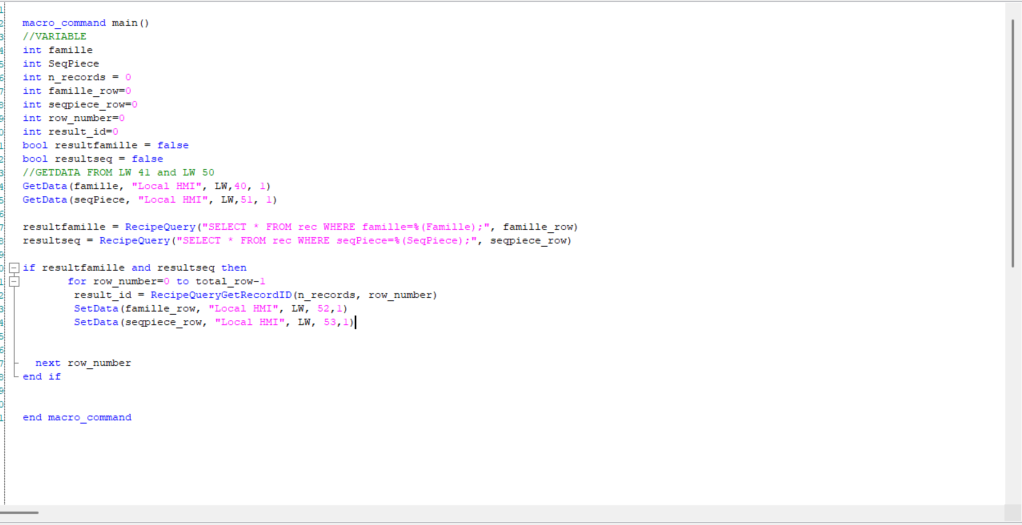
it’s the first that i work with a recipe i was able to create a recipe database and also import, export clear recipe everything right. now i want to use a macro to search data based on user input. the user for example will enter INPUT A an INPUT B then the macro should get the record of INPUT A and INPUT B and also output the value of C and D on the record of input A and INPUT B. SUpposed that my column on my recipe is A,B,C,D, user enter A and B and the macro should give C and D that match input of the user . here is what i did but seems not working input A is on LW41 and input B is on LW50. search button is only executing the macro also i want to print a text if A and B enterd by the user is existing on recipe.
Hi @younesstazi1,

Could you share images of what your recipe database looks like so we can replicate it better on our side. Also did you have any error codes when compiling the project?

Some initial thoughts on your project that I noticed are:

  • Line 21, total_row does not get initalized as a variable so it might lead to error codes. Try code below:
short total_row
GetData(total_row, "Local HMI", RECIPE, "test.Count") //recipe named test, and it gets the count of the recipe. 
  • Within macros ints are 32 bits and shorts are 16 bit ints. Therefore this might be causing some problems.

Lastly, I want to clarify that we are getting user input, then searching the recipe database for those 2 values. If both values are found then we print out record of the found A and B indexes.

Thank you!

here is a picture of recipe. yes the user will enter the input into lw40 and lw51 then if those match record then will print record of the value entered and give dimension approriate to this record

Hi @younesstazi1,

Below is a post on how a macro was used to search through a recipe database based on a SQL query. Please scroll down to step 4 which is the advanced section which is what you will need. Please let me know if you have any more questions!

Thank you!
Recipe Database Search For or Filter Items

Hello Aaron,

Thank you for your help first, i tried to search in my recipe based on the user input which is seqpiece as INT, and output seqpiece from recipe in LW52 and actual record in LW53 but everytime where user enter a value that exist on recipe data LW52 show 81 and LW53 show 0. i’m missing something ?

Hi @younesstazi1 ,

Below I have attached our post on how to debug macros by setting up break points. Could you install a few breaks and watch variables to investigate where your values are getting caught.

Furthermore I saw that your seqpiece is an array of char but I believe you’re setting this value in to a numeric object into LW 53. Could you also double check the data type is consistent from the PLC to Marco to the object.

Thank you and please let me know of your findings!

yes exatly teh seqpiece is INT but in the link that you sent to use stringcat it should be char

Hi @younesstazi1 ,

Could you please share your HMI serial number for our reference?

Apologies, I didn’t realize you needed that to complete your SQL query. Could you try declaring a new short variable so that the data types on line 28 match up, and then assign that new variable on line 33?

Please let me know the results. If it still doesn’t work, could you check whether the debugging and watch variables show any anomalies?

Thank you!

Hi Aaron,

sure, the serial number is 2407104846.

i tried to add the new var as short but it give same thing. Also i tried to add breakpoint ino the debuger but i cannot see the live variable( i want to add it in watch section and when i hover the the mouse under name it not give the possibility to add a new variable)

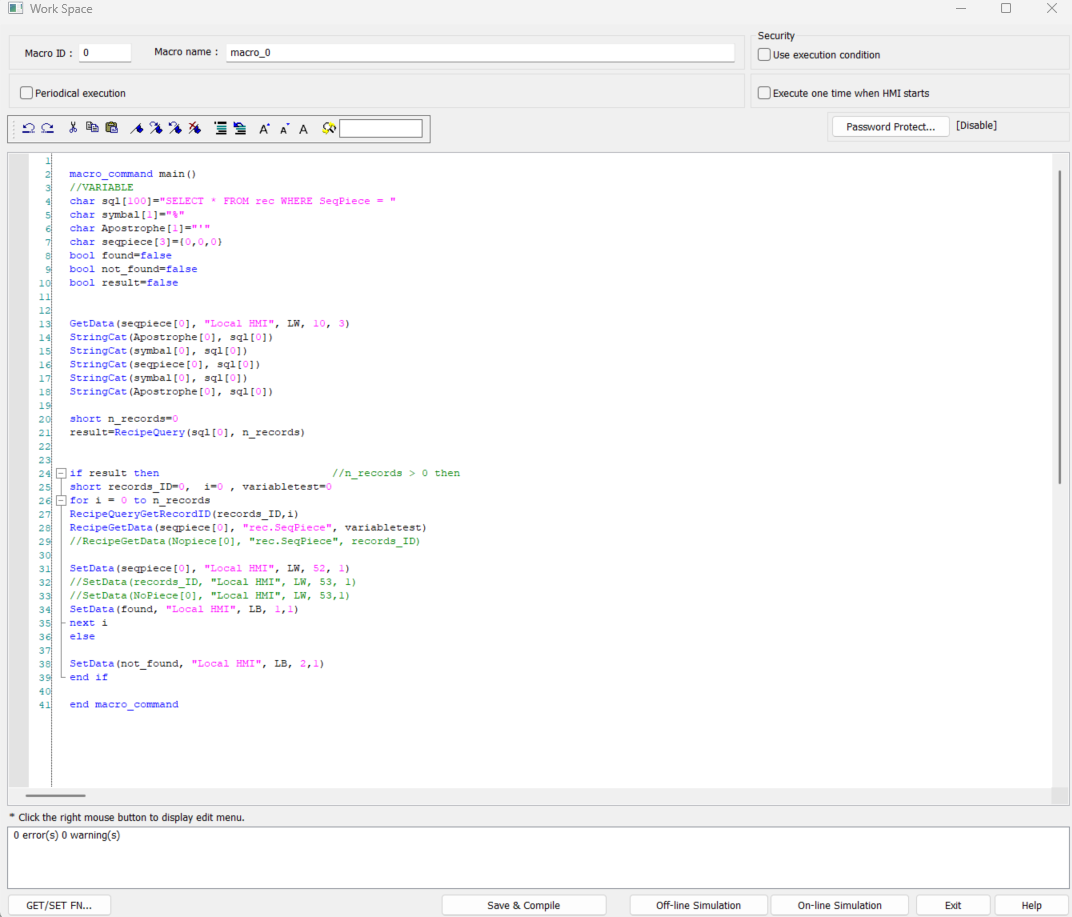
macro_command main()
//VARIABLE
char sql[100]=“SELECT * FROM rec WHERE SeqPiece = "
char symbal[1]=”%"
char Apostrophe[1]=“'”
char seqpiece[3]={0,0,0}
bool found=false
bool not_found=false
bool result=false

GetData(seqpiece[0], “Local HMI”, LW, 10, 3)
StringCat(Apostrophe[0], sql[0])
StringCat(symbal[0], sql[0])
StringCat(seqpiece[0], sql[0])
StringCat(symbal[0], sql[0])
StringCat(Apostrophe[0], sql[0])

short n_records=0
result=RecipeQuery(sql[0], n_records)

if result then //n_records > 0 then
short records_ID=0, i=0 , variabletest=0
for i = 0 to n_records
RecipeQueryGetRecordID(records_ID,i)
RecipeGetData(seqpiece[0], “rec.SeqPiece”, variabletest)
//RecipeGetData(Nopiece[0], “rec.SeqPiece”, records_ID)

SetData(seqpiece[0], “Local HMI”, LW, 52, 1)
//SetData(records_ID, “Local HMI”, LW, 53, 1)
//SetData(NoPiece[0], “Local HMI”, LW, 53,1)
SetData(found, “Local HMI”, LB, 1,1)
next i
else

SetData(not_found, “Local HMI”, LB, 2,1)
end if

end macro_command

reagrds,