Sequential Recipe Execution With PLC Trigger Using RecipeQuery in EasyBuilder Pro

Sequential Recipe Execution With PLC Trigger Using RecipeQuery in EasyBuilder Pro
none 0.0 0
  • HMI Model: CMT-FHDX-820
  • EasyBuilder Pro Version: 6.10

What is the best way to batch process through a recipe → PLC.

Example:

From the HMI, a run object is called by the user that will initiate the first row in the selected/que’d in recipe.

Once the process is completed by the PLC, it (PLC) will call for the next row to be sent to the PLC.

So my assumption is I could us a trigger to pull the next row within the recipe but…

1.) How to do maintain which row(s) has been processed by the PLC within the HMI. (I would like to keep that running total on the HMI as well, so the HMI should know which row(s) has been process)

2.) What is the best method to trigger next row within the recipe.

I have seen examples on how to send the data to the plc but this process should be more of an automated sequence of events as the PLC is working through que’d recipe.

Hi @outbound6 ,

To create a queue-like structure, we recommend using SQL filtering within a macro to access the values in each row of the recipe database. To keep track of which rows have been processed, we also suggest adding another column in the recipe database (for example, num). This can represent the position of each row in the queue and allow the HMI to display a running total of processed rows.

For the trigger, within the processing loop you can link this to a toggle bit such as LB-0. When the bit is ON, the next row in the queue is processed. After the process is complete, the bit is turned OFF, and the system waits until the bit is turned ON again to process the next row.

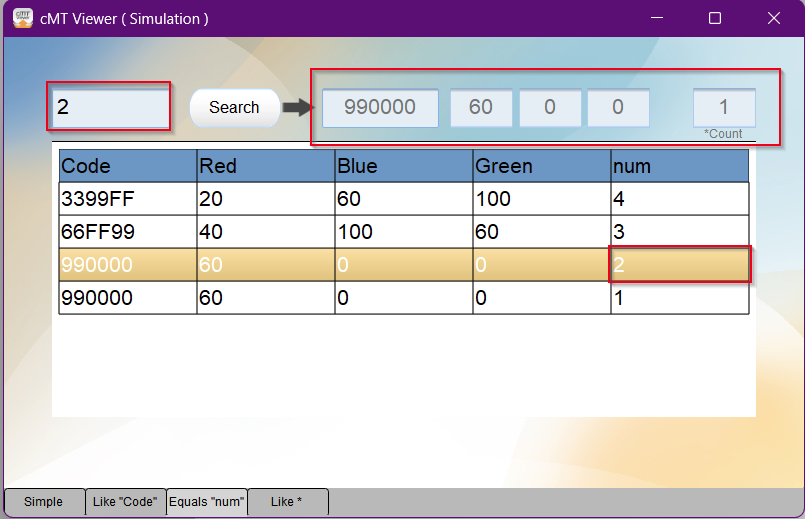
Below is a demo and the referenced forum post. The changes are on Window 12, and the macro used is “Search EQUAL”.

Search Demo

Search and Filter Items within a recipe database

Values within row show up in memory address according to num value entered

Macro Used


macro_command main()
	char sql[100] = "SELECT * FROM Mixer WHERE num = "
	char symbal[1]="%"
	char Apostrophe[1]="'"
	char red[3] = {0,0,0}
	short clear[32]
	
	FILL(clear[0], 0, 32) // Initialize clear array
	SetData(clear[0], "Local HMI", LW, 2000, 32) // Clear current results
	
	GetData(red[0], "Local HMI", LW, 1000, 3)
	
	StringCat(red[0], sql[0])
	
	short n_records = 0
	
	RecipeQuery(sql[0], n_records)
	SetData(n_records, "Local HMI", LW, 2009, 1)
	if n_records > 0 then
		short recordID = 0, i = 0
		short rgb[3] = {0,0,0}
		char dcode[6] = {0,0,0,0,0,0}
		for i = 0 to n_records
			RecipeQueryGetRecordID(recordID, i)
			RecipeGetData(dcode[0], "Mixer.Code", recordID)
			RecipeGetData(rgb[0], "Mixer.Red", recordID)
			RecipeGetData(rgb[1], "Mixer.Green", recordID)
			RecipeGetData(rgb[2], "Mixer.Blue", recordID)
			
			SetData(dcode[0], "Local HMI", LW, 2000, 6)
			SetData(rgb[0], "Local HMI", LW, 2006, 1)
			SetData(rgb[1], "Local HMI", LW, 2007, 1)
			SetData(rgb[2], "Local HMI", LW, 2008, 1)
			DELAY(1500)
		next
	end if
end macro_command

Hi @outbound6 ,

Here is also a updated version of the project where a for loop is implemented so that it goes up the list automatically and trigger set to LB-0 is tied to a toggle switch to go on to the next row of the queue.

Please let us know if you have any questions.
Updated Demo

macro_command main()
  char symbal[1]="%"
  char Apostrophe[1]="'"
  char num[4] = "1"
  short clear[32]
  short count = 0
 
  FILL(clear[0], 0, 32) // Initialize clear array
  SetData(clear[0], "Local HMI", LW, 2000, 32) // Clear current results

GetData(count, "Local HMI", RECIPE, "Mixer.Count")
    
    short curr 
    for curr = 1 to count 
    
    bool trig
    // Get PLC trigger, assume a bit trigger
	GetData(trig, "Local HMI", LB, 0, 1)

	while not trig
    	DELAY(1000)
    	GetData(trig, "Local HMI", LB, 0, 1)
	wend
        char sql[100] = "SELECT * FROM Mixer WHERE num = "
       
        if curr < 10 then
            DEC2ASCII(curr, num[0], 1)
        else if curr < 100 then
            DEC2ASCII(curr, num[0], 2)
        else if curr < 1000 then
            DEC2ASCII(curr, num[0], 3)
        else 
            DEC2ASCII(curr, num[0], 4)
        end if

        StringCat(num[0], sql[0])
        short n_records
        RecipeQuery(sql[0], n_records)


       if n_records > 0 then
        short recordID = 0, i = 0
        short rgb[3] = {0,0,0}
        char dcode[6] = {0,0,0,0,0,0}
      
           RecipeQueryGetRecordID(recordID, i)
       RecipeGetData(dcode[0], "Mixer.Code", recordID)
       RecipeGetData(rgb[0], "Mixer.Red", recordID)
       RecipeGetData(rgb[1], "Mixer.Green", recordID)
       RecipeGetData(rgb[2], "Mixer.Blue", recordID)
           
       SetData(dcode[0], "Local HMI", LW, 2000, 6)
       SetData(rgb[0], "Local HMI", LW, 2006, 1)
       SetData(rgb[1], "Local HMI", LW, 2007, 1)
       SetData(rgb[2], "Local HMI", LW, 2008, 1)
       DELAY(1500)
      end if
    next
  
end macro_command

Running through this, I’m not successful acquiring data. (Trigger is good but no data) My hope it’s something simple.

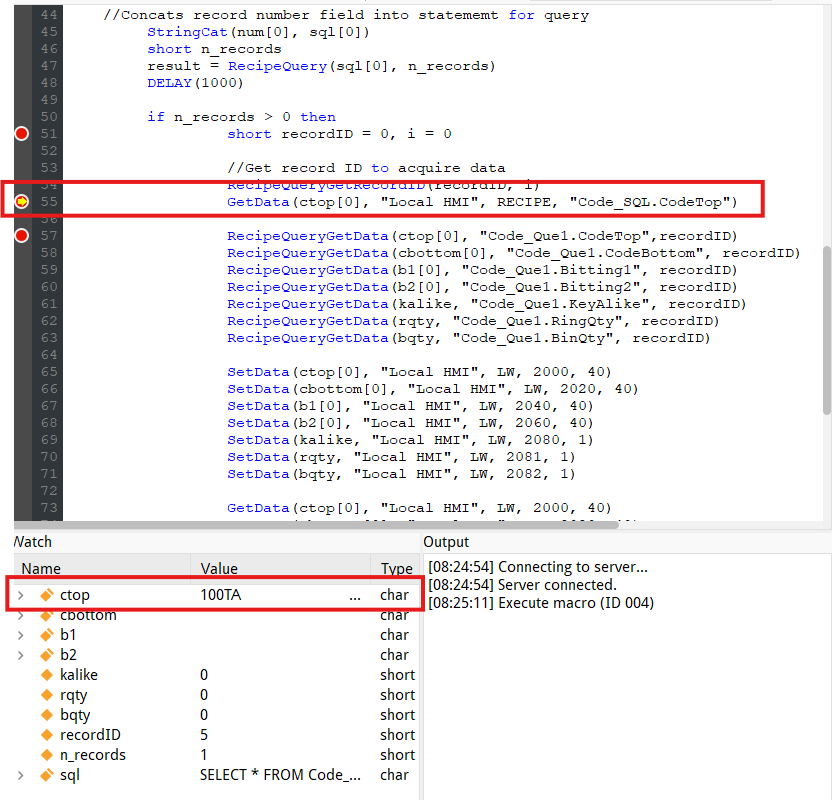
Running in debug and i don’t see any data being placed within the destination(s) of the function block RecipeQueryGetData.

bool resultchar num[4] = “1”short clear[200], count = 0, kalike = 0, rqty = 0, bqty = 0char ctop[40] = {0,0,0,0,0,0,0,0,0,0,0,0,0,0,0,0,0,0,0,0,0,0,0,0,0,0,0,0,0,0,0,0,0,0,0,0,0,0,0,0}char cbottom[40] = {0,0,0,0,0,0,0,0,0,0,0,0,0,0,0,0,0,0,0,0,0,0,0,0,0,0,0,0,0,0,0,0,0,0,0,0,0,0,0,0}char b1[40] = {0,0,0,0,0,0,0,0,0,0,0,0,0,0,0,0,0,0,0,0,0,0,0,0,0,0,0,0,0,0,0,0,0,0,0,0,0,0,0,0}char b2[40] = {0,0,0,0,0,0,0,0,0,0,0,0,0,0,0,0,0,0,0,0,0,0,0,0,0,0,0,0,0,0,0,0,0,0,0,0,0,0,0,0}int recordIDs = 0int total_row=0int row_number=0bool result_querybool result_id

FILL(clear[0], 0, 200) // Initialize clear arraySetData(clear[0], “Local HMI”, LW, 2000, 200) // Clear current results

GetData(count, “Local HMI”, RECIPE, “Code_Que1.Count”) //Gets record count from recipe

short curr 
for curr = 1 to count 

bool trig
// Get PLC trigger, assume a bit trigger
GetData(trig, "Local HMI", LB, 50, 1)
// Waiting for trigger to be active
while not trig
	DELAY(500)
	GetData(trig, "Local HMI", LB, 50, 1)
wend
//Trigger active, sets statement to char
char sql[100] = "SELECT * FROM Code_Que1 WHERE No = "
   
if curr < 10 then
    DEC2ASCII(curr, num[0], 1)
else if curr < 100 then
    DEC2ASCII(curr, num[0], 2)
else if curr < 1000 then
    DEC2ASCII(curr, num[0], 3)
else 
    DEC2ASCII(curr, num[0], 4)
end if

//Concats record number field into statememt for query
StringCat(num[0], sql[0])
short n_records
result = RecipeQuery(sql[0], n_records)
DELAY(1000)

if n_records > 0 then
	short recordID = 0, i = 0
	
		//Get record ID to acquire data
		RecipeQueryGetRecordID(recordID, i)
	
	RecipeQueryGetData(ctop[0], "Code_Que1.CodeTop",recordID)
	RecipeQueryGetData(cbottom[0], "Code_Que1.CodeBottom", recordID)
	RecipeQueryGetData(b1[0], "Code_Que1.Bitting1", recordID)
	RecipeQueryGetData(b2[0], "Code_Que1.Bitting2", recordID)
	RecipeQueryGetData(kalike, "Code_Que1.KeyAlike", recordID)
	RecipeQueryGetData(rqty, "Code_Que1.RingQty", recordID)
	RecipeQueryGetData(bqty, "Code_Que1.BinQty", recordID)
	
	SetData(ctop[0], "Local HMI", LW, 2000, 40)
	SetData(cbottom[0], "Local HMI", LW, 2020, 40)
	SetData(b1[0], "Local HMI", LW, 2040, 40)
	SetData(b2[0], "Local HMI", LW, 2060, 40)
	SetData(kalike, "Local HMI", LW, 2080, 1)
	SetData(rqty, "Local HMI", LW, 2081, 1)
	SetData(bqty, "Local HMI", LW, 2082, 1)
	
	SetData(ctop[0], "Rockwell EtherNet/IP (ControlLogix)", "KeyData[0].LockCode.DATA[0]", 40)
	SetData(cbottom[0], "Rockwell EtherNet/IP (ControlLogix)", "KeyData[0].LockCode2.DATA[0]", 40)
	SetData(b1[0], "Rockwell EtherNet/IP (ControlLogix)", "KeyData[0].KeyBitting.DATA[0]", 40)
	SetData(b2[0], "Rockwell EtherNet/IP (ControlLogix)", "KeyData[0].KeyBitting2.DATA[0]", 40)
	SetData(kalike, "Rockwell EtherNet/IP (ControlLogix)", "KeyData[0].KeyAlikeQty[0]", 1)
	SetData(rqty, "Rockwell EtherNet/IP (ControlLogix)", "KeyData[0].RingQty[0]", 1)
	SetData(bqty, "Rockwell EtherNet/IP (ControlLogix)", "KeyData[0].BinQty[0]", 1)

	DELAY(1500)
end if

I’m also assuming i can Setdata back to the PLC during this macro, I kept the “LW” setdata(s) because i like to visually see (during testing) the data being queried on the HMI object(s).
@outbound6,

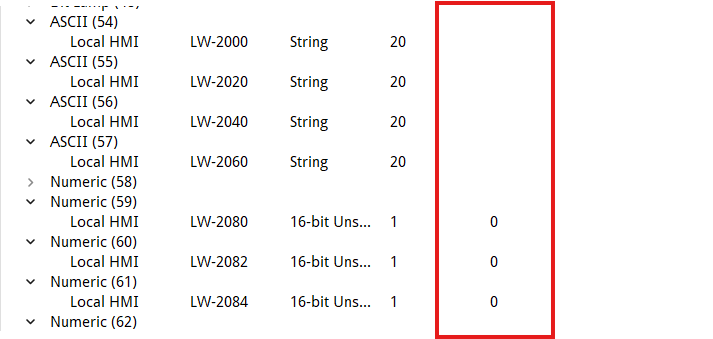
Just to confirm, did you add a “No” column to your existing recipe? Also, do you see any data go into your LW-2000, LW-2020, etc test registers when you run this macro?

Yes, added a field for number. (No)

I don’t see any data being placed with LW 2000’s

I changed the macro to write (setdata) to address RW and it works, so need to understand while i cannot write to EM. Any suggestions would be great!

@outbound6,

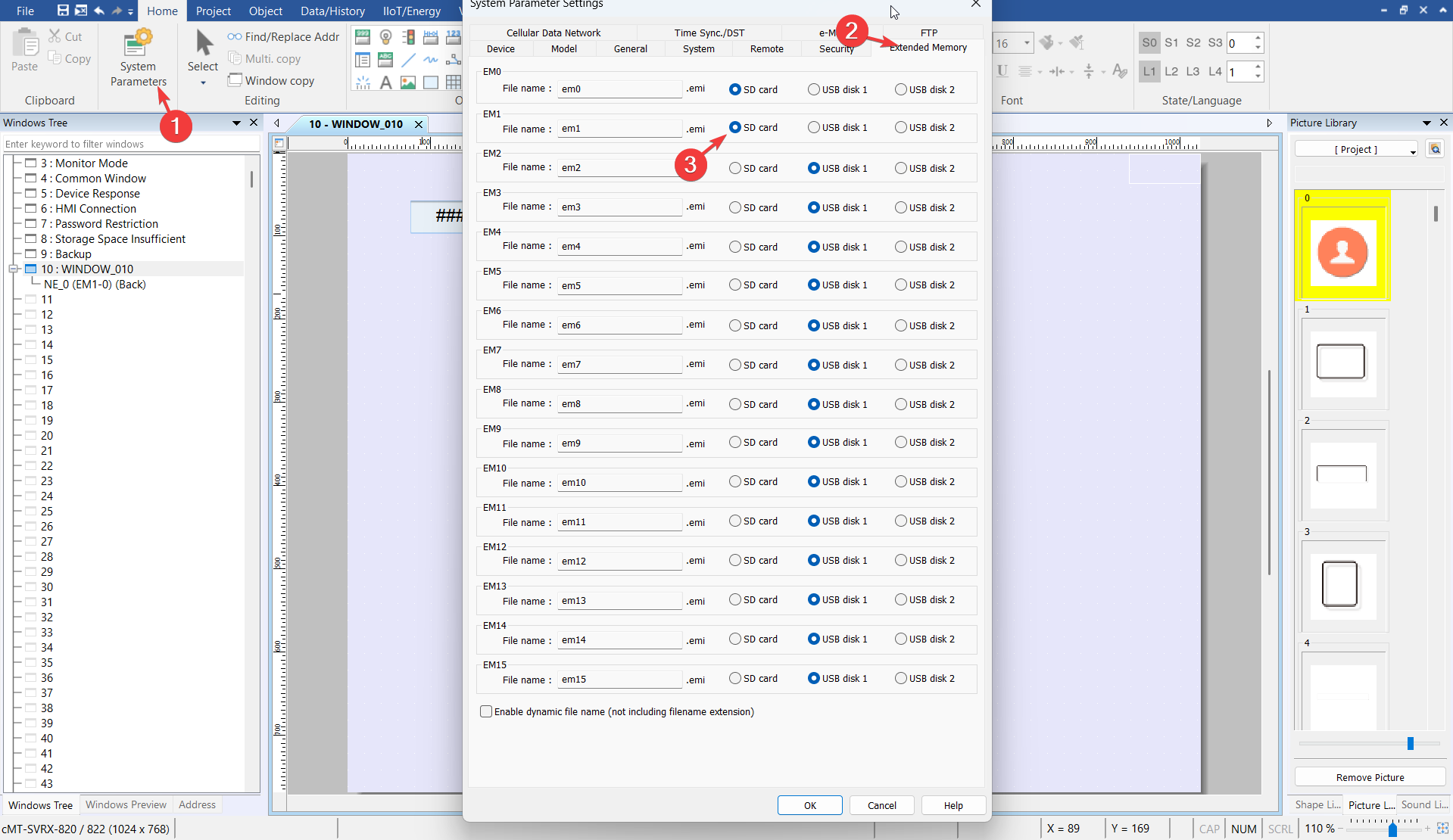
I mentioned this in your other post, but did you configure the extended memory location within your project to “SD card” as in the image below?

Well, the version of EBpro i was running was old…

Updated version and that corrected the issue for seeing the extended memory.

Still not seeing the data being set within LW 2000 or being sent to the PLC.

I know there are records within the recipe

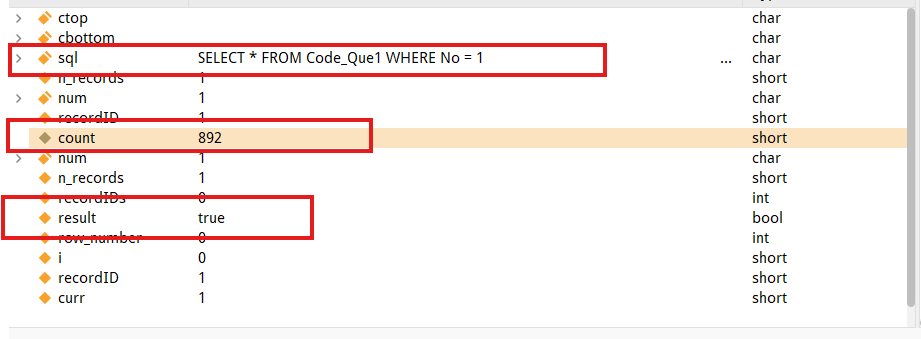
I can see the statement being sent (Is the syntax correct?)

I can see that the statement gave me a true valve

But…. i see no data being placed within the “SetData” locations.

Hi @outbound6,

I see from your image that ctop, which is set to LW-2000, is empty. Can you confirm that the correct value is captured by the RecipeQueryGetData(ctop[0], "Code_Que1.CodeTop", recordID) line?

We also noticed that the way variables are initialized in your macro might be causing some issues. Could you try the updated initialization of variables from the code below?

bool result
char num[4] = "1"
short clear[200], count = 0, kalike = 0, rqty = 0, bqty = 0
char ctop[40] = {0,0,0,0,0,0,0,0,0,0,0,0,0,0,0,0,0,0,0,0,0,0,0,0,0,0,0,0,0,0,0,0,0,0,0,0,0,0,0,0}
char cbottom[40] = {0,0,0,0,0,0,0,0,0,0,0,0,0,0,0,0,0,0,0,0,0,0,0,0,0,0,0,0,0,0,0,0,0,0,0,0,0,0,0,0}
char b1[40] = {0,0,0,0,0,0,0,0,0,0,0,0,0,0,0,0,0,0,0,0,0,0,0,0,0,0,0,0,0,0,0,0,0,0,0,0,0,0,0,0}
char b2[40] = {0,0,0,0,0,0,0,0,0,0,0,0,0,0,0,0,0,0,0,0,0,0,0,0,0,0,0,0,0,0,0,0,0,0,0,0,0,0,0,0}
int recordIDs = 0
int total_row=0
int row_number=0
bool result_query
bool result_id

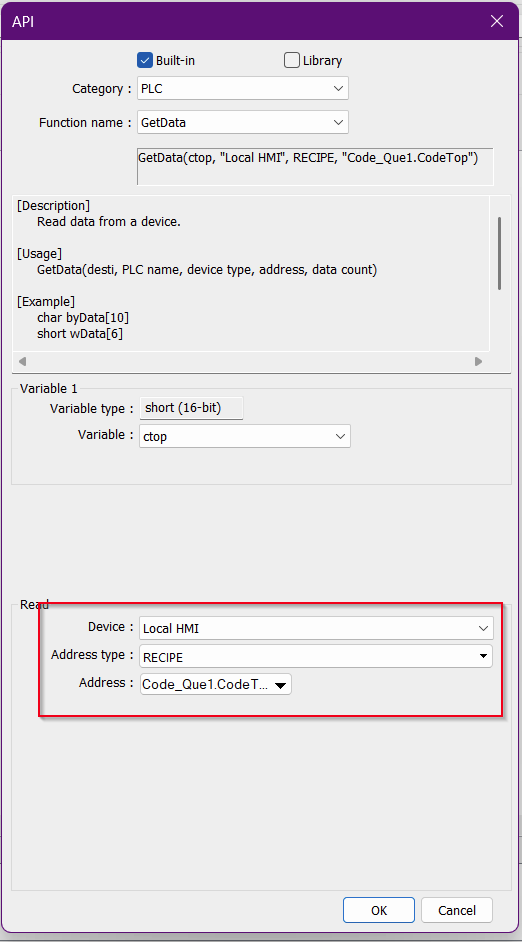
Could you also try using a GetData function instead of RecipeQueryGetData and see if the value is placed correctly in the LW-2000 register?

GetData(ctop, "Local HMI", RECIPE, "Code_Que1.CodeTop")

During testing, could you also let us know what the value of ctop is by using a breakpoint on the line below.

Added the getdata, this is getting the first record within the recipe but everything else isn’t working.

Hi @outbound6 ,

Is the get and set data working correctly for ctop with the value being displayed correctly within LW 2000. If so can you replace the RecipeQueryGetData with just GetData’s and see if all the values are being displayed correctly or if any other issues arise.

Thank you!

Everything is working correctly now, thanks for all your help!

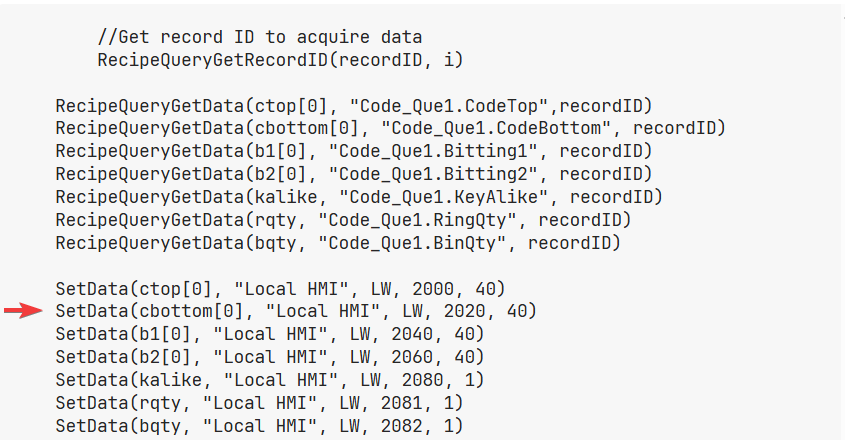
Changed:

image

1 Like