When using offline Simulation in EBpro i get a “Device server disconnected!”. This is on every program I try. Even ones I have never had this issue with in the past.
Assuming there is a windows background server that needs to be running for offline mode to work properly and something is conflicting with it starting up?
Thank you for your contribution to the forum. Could you try uninstalling and reinstalling EasyBuilder Pro, as this sometimes resolves the issue? Here is a link to the software, in case you need it: Link
I was able to find my issue. It was a startup program called “Incredibuild manager” which was installed by “Microsoft Visual Studio 2022”.
Everything worked normal on another laptop and I was able to narrow it down.
Thank you!
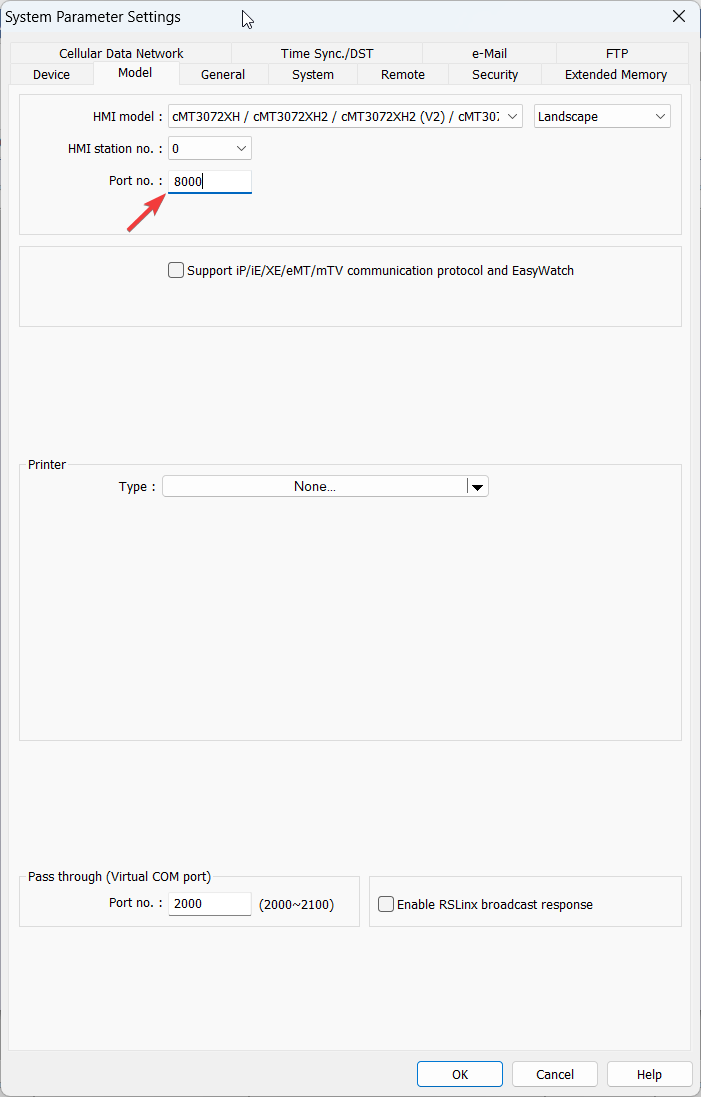
Hey for anyone that googles this issue and finds this page, Weinteks dev server runs on port 8000.
Run this command on windows to find what application is using port 8000 netstat -ano | findstr :8000
For me it was the system where the process ID is 4
The system had reserved
TCP [::]:8000 [::]:0 LISTENING 4
Then I ran this to show what app it was reserved for
netsh http show servicestate
Gave me this output:
    Request queue name: Request queue is unnamed.
        Version: 2.0
        State: Active
        Request queue 503 verbosity level: Basic
        Max requests: 1000
        Active requests: 0
        Queued requests: 0
        Max queued request age: 0s
        Requests arrived: 0
        Requests rejected: 0
        Cache hits: 0
        Number of active processes attached: 1
        Processes:
            ID: 7688, image: <?>
            Services: Autodesk Data Management Server Revit Dynamo Extension Service
            Tagged Service: Autodesk Data Management Server Revit Dynamo Extension Service
        Registered URLs:
            HTTP://+:8000/DYNAMOHELPERSERVICE/SERVICE/
Pay attention to the processes bit
And then I ran these 2 commands as administrator to unreserve them:
sc stop “Autodesk Data Management Server Revit Dynamo Extension Service” sc config “Autodesk Data Management Server Revit Dynamo Extension Service” start= disabled
Thank you for contributing to our forum! This was a great write-up, also please note that the port number is configurable within the model tab of the system parameters: