- HMI Model: MT8072iP
- EasyBuilder Pro Version: see below
Hi,
I want to take a copy of a working HMI project and install on my laptop to develop some some further improvements. The working HMI has an attached PV with Windows 10. I have updated Easy Builder Pro - the version is V6.10.02.300 Build 2026.05.06
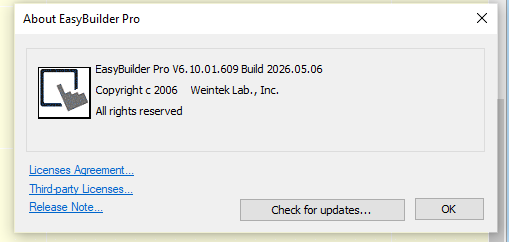
I compressed the project xx.emtp file and transferred a copy to my laptop. My laptop has Windows 11: The latest version of EBP is shown on the screen shot below - V6.10.01.609 Build 2026.05.06.
I have checked for updates on both PCs and get the report I have the latest version on both - although the versions are different
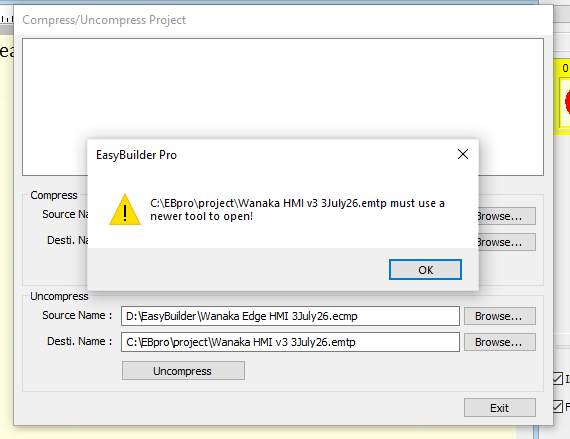
When I attempted to Uncompress the .emtp file I got the following message?
how do I resolve this?
Hi @BrianF_NZ ,
Thank you for your question! EasyBuilder Pro does not support opening projects in earlier versions once they have been saved in a newer version. Since the project was last saved in V6.10.02.300, it must be opened using V6.10.02.300 or later.
Are you able to update EasyBuilder Pro from V6.10.01.609 to the latest version and then try opening the project again?
On the laptop with the older version of EBP, I have (many times) checked for Updates (File/About). I now get a message “You have installed the latest version in the other path.”
I dont understand this message. Which “other path”??
After checking further I found I had 2 versions of EPB installed. I think there had been some confusion about uninstalling the old version after an update.
Anyway, both my instances of EBP now have the same version, so I could uncompress the emtp file
Hi @BrianF_NZ ,
We are glad to hear that you were able to uncompress the project file.
The message, “You have installed the latest version in the other path,” indicates that another installation of EasyBuilder Pro exists in a different directory on your PC. We recommend installing different versions of EB Pro in separate installation paths to help avoid file conflicts between the two versions.