Hello,
I have a communication problem. I am using a Weintek 8102iP HMI, which is connected to an Omron NJ/NX series controller via Ethernet/IP, and also to a Siemens S7-1200 PLC.
The issue is as follows:
I downloaded the program to the HMI and everything was working correctly. I performed all tests and everything was OK. Then I powered off the machine and powered it on again. After restart, the HMI suddenly showed that there was no communication with the controllers. I checked everything (settings, cables, IP addresses, etc.) and everything seems to be correct, but the communication was gone.
I decided to download older versions of the programs to each device, and suddenly the communication came back.
What could be the reason for this behavior?
In my project I am using, among other things, Global Data Transfer. There is communication between the two PLCs, as well as communication between Siemens and the HMI, and Omron and the HMI. In total, I have 4 global communication channels.
I suspect that Global Data Transfer might be causing the problem, but I am not sure, because I need this global communication in my application.
Hi @michal123 ,
Thank you for you question.
-
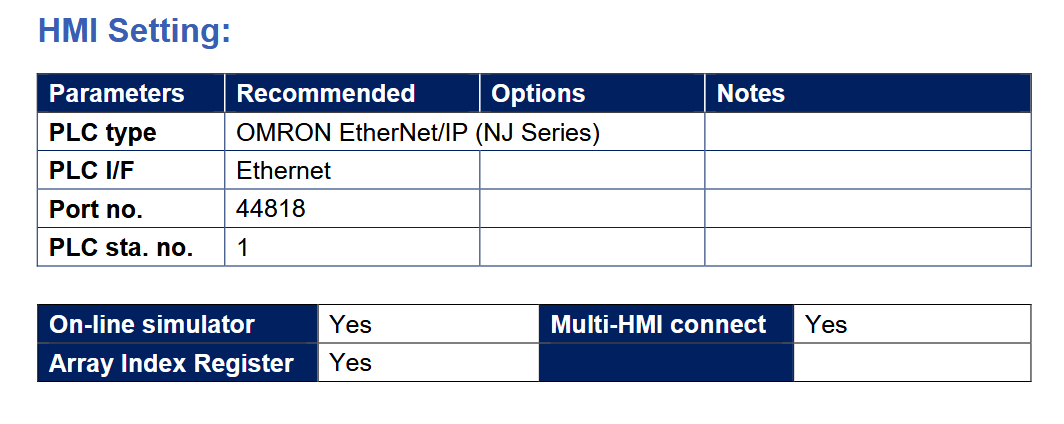
Here is a LINK to all of our PLC connection guides. Could you ensure that all of the HMI setting parameters are correct through out the project.
-
Can you ensure that all imported registers are used within the program. This error may occur when a tag has been renamed or deleted so EB Pro can’t match the tags to the PLC leading to the connection error.
-
Could you also send us a images of your project specially your global data transfer object, for us to look at.
-
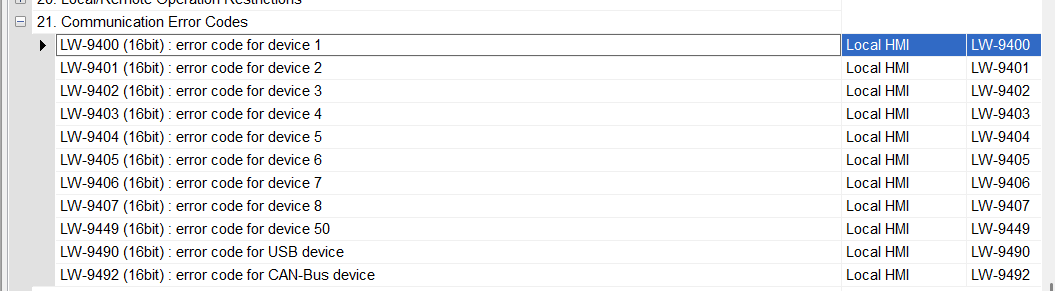
Below are communication error codes linked to system address. Could you plot these addresses down and see if you get a error code out.
Boa tarde!
Tive um problema parecido de perda de comunicação, foi quando alterei uma tag no plc, a solução foi exportar as tags novamente no cx designer e importar no EBPRO, parece que a arquiteturo do driver da omron perde comunicação qdo muda o mapa de memoria

Good afternoon!
I had a similar problem with communication loss when I changed a tag in the PLC. The solution was to export the tags again in CX Designer and import them into EBPRO. It seems that the Omron driver architecture loses communication when the memory map changes.
Hi @eddy_neves,
The “Device no response” message is a general error message that will display if any one tag within the HMI fails to read from the PLC. It does not necessarily mean that the HMI cannot communicate with the PLC, it just means that at least one tag cannot.