- HMI Model: cMTX 3162X (V2)
- EasyBuilder Pro Version: 6.10.02.231 Build 2026.01.21
When creating a template window some of the label text does not change.
In this case it is the label
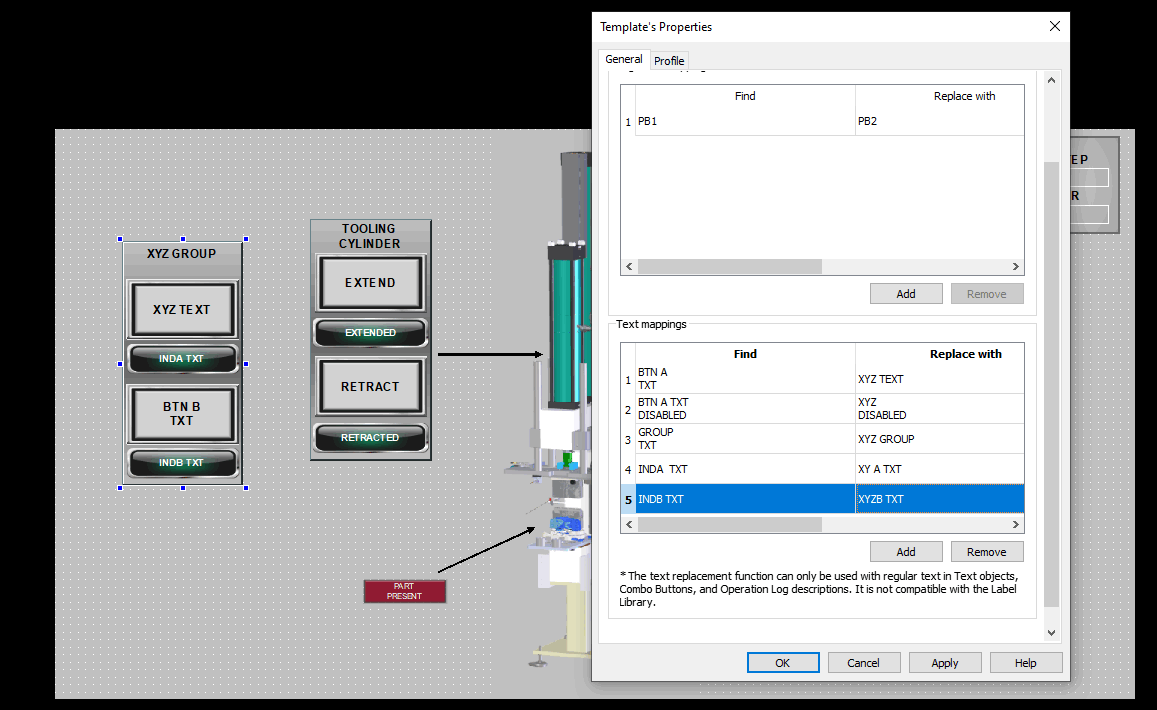
in my indicators as seen in the screen shot.
Hi @rday1971 ,
The text you are wanting to change is it a text./comment object or a ASCII object’s label? As the the “Find” and “Replace with” feature is only compatible with static text and cannot be used with labels in the label library"
Below is also a forum post about template windows.
Hello Aaron,
Thanks for the link. I found a work around for the indicator objects by placing a text object on top of them and removing their labels. Its strange that the label text of the combo buttons will change but not the indicators.
Hi @rday1971 ,
We are glad to hear you found a work around for the template window, and thank you for sharing your work around as well!