Macro can't send data to PLC Tag

Macro can't send data to PLC Tag
none 0.0 0
  • HMI Model: MT8102IE
  • EasyBuilder Pro Version: 06.10.01

I need to transfer a Barcode to my Leadshine PLC.

The Barcode scan works, and I can access properties like RESULT and even BARCODE[0] which returns an accurate length in bytes. I can fill an ASCII box on the HMI with the correctly scanned data.
(Also- the HMI has been reading and writing general tag data successfully for over 6 months)

I have pinpointed the primary issue using the following macro code:

bool bToggle = 0
short sChar //sTring[4] = “Yes!”
short sNum = -7
char strCharX[1] = “X”, strCharZ[1] = “Z”

macro_command main()
GetData(bToggle, “CODESYS V3 (Ethernet)”, “Application.GVL_DATA.bNewBarcodeScanned”, 1)

if bToggle == 1 then
bToggle = 0
sNum = -57

//StringSet(strCharX[0], “CODESYS V3 (Ethernet)”, “Application.GVL_DATA.strBCDigit_6”, 1)
SetData(strCharX[0], “CODESYS V3 (Ethernet)”, “Application.GVL_DATA.uiBarcode_6”, 1)
//SetData(strCharX[0], “CODESYS V3 (Ethernet)”, “Application.GVL_DATA.strBCDigit_6”, 1)
//StringSet(strCharZ[0], “CODESYS V3 (Ethernet)”, “Application.GVL_DATA.strBCDigit_6”, 1)
//StringSet(strCharZ[0], “CODESYS V3 (Ethernet)”, “Application.GVL_DATA.aryBarcodeChars[0]”, 1)
DELAY (10)
else
bToggle = 1
sNum = 22
//StringSet(strCharX[0], “CODESYS V3 (Ethernet)”, “Application.GVL_DATA.strBCDigit_6”, 1)
SetData(strCharZ[0], “CODESYS V3 (Ethernet)”, “Application.GVL_DATA.uiBarcode_6”, 1)
//SetData(strCharZ[0], “CODESYS V3 (Ethernet)”, “Application.GVL_DATA.strBCDigit_6”, 1)

end if

SetData(bToggle, “CODESYS V3 (Ethernet)”, “Application.GVL_DATA.bNewBarcodeScanned”, 1)
SetData(sNum, “CODESYS V3 (Ethernet)”, “Application.GVL_DATA.uiBarcodeLength”, 1)

end macro_command

The above code runs every 3 seconds and properly changes an unsigned int and a boolean variable (every 3 seconds)

If I uncomment any commands that reference a string, the macro fails.

i.e. the macro stops toggling the values. (actually it just fails to set or change any tag values at the PLC.)

My Tags are set for 2 bytes per char, but I have tried both. Same result- fails on write to a PLC string, works if I comment that command out.

What’s wrong?
Hi @pfarrell ,

Thank you for your question. It appears the issue occurs specifically when the macro attempts to write data to the CODESYS PLC.

To troubleshoot this issue, we recommend re-importing the PLC tags from CODESYS into EasyBuilder Pro. This step helps ensure that any changes made to the PLC program since the original tag import are properly updated and recognized within the macro.

Additionally, we recommend using SetData() instead of StringSet() for this transfer. Please give these troubleshooting steps a try and let us know the results.

As originally stated:

(Also- the HMI has been reading and writing general tag data successfully for over 6 months)

So no- this is not a problem with the Tag database.

I’ve made a lot of changes while debugging this issue and “reimported” the tags about 20 or 30 times.

Your comment:

“ It appears the issue occurs specifically when the macro attempts to write data to the CODESYS PLC.” is not correct.
The HMI macro is writing Bool and UINTs to the PLC every 3 seconds, in the macro I pasted into this message. That works.

Also described in my message was the fact that if I use GetData to send data to a PLC string variable, the macro fails. The other variables that change state every three seconds never turn on.

The macro I shared works.

If I send data through PLC tags, it works. And the PLC variables change state/value.

IF I try to write to a PLC string the macro fails.

Then none of the (macro) data is transferred to the PLC.

If I use StringSet to write to a string the macro fails.

If I use SetData to write to a PLC string, the macro fails.

If I don’t write to a string, it works, but if I write to a string it doesn’t work.

The PLC works, the HMI screens and buttons work, the macro, which is required to send Barcode data, cannot work.

I’m sending bytes as unsigned ints and then converting them to string in the PLC.

Is there a better way?

Are your macro commands blocking? If they are its seems that the earliest commands would register in the PLC, before the macro “hangs” on a string command.

But what I observed is that the macro fails and no variables are sent.

Hi @pfarrell,

In consideration of what my colleague @Arden.y, stated, can you please let us know where else in the application you are reading or writing to “Application.GVL_DATA.strBCDigit_6” or another tag that is commented out so that we can confirm communication with these tags specifically?

In addition, please note that the “GetData” does not send data to the PLC it can only be used to poll data.

To confirm, will communication also fail if you try to write data to a PLC STRING using an ASCII object? If so, can you please let us know how the STRING tags within your CODESYS project are defined? As an example, are these WSTRING or STRING and do they use a specific char count like STRING(28)?

These are strings.

I think that the only way to write to a string is in a macro.

For my application, there is no other place where strings are written (or read).

Please let me know if there is another way to reference a string tag in EasyBuilder.

Thanks

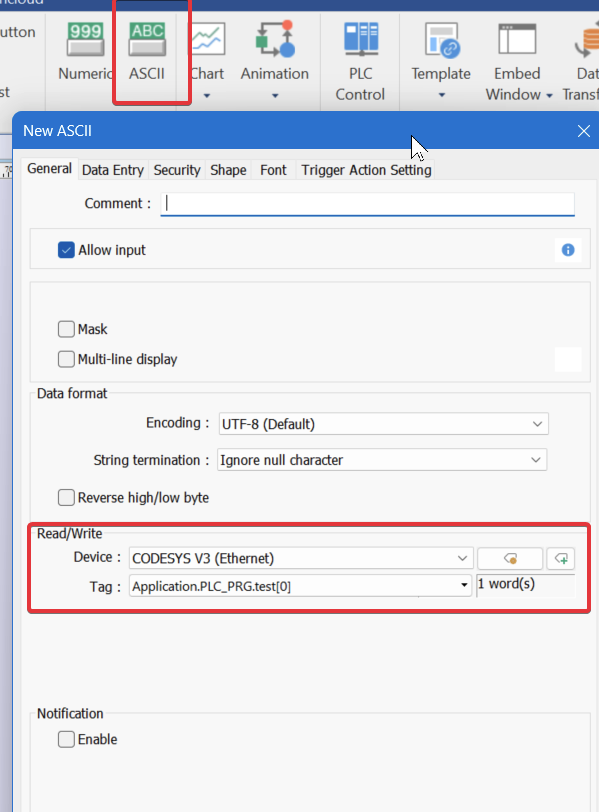
I have been using and ASCII object which calls a popup keyboard, the user enters a numeric string (presses enter) and then the ASCII value is transferred to a string variable in the PLC. Working for 6 months.

strMyString : STRING(22) (or whatever length) Not Wide Strings

I’ve tried setting string length to match macro SetData size as suggested

@pfarrell,

As you noted in your follow-up response, it is also possible and preferred to read STRING tags directly using ASCII objects. It is also possible to reference and transfer STRING data using Data Transfer objects. Will this work for your application?