- HMI Model: cmt-fhdx-820
- EasyBuilder Pro Version:6.10
Need to select multiple rows within Recipe View and Transfer them to another recipe. How can this be achieved?
Need to select multiple rows within Recipe View and Transfer them to another recipe. How can this be achieved?
Hi @outbound6,
Thank you for contributing to our forum.
For the first part, it is not possible to select multiple rows within our recipe view object.
To transfer data between recipes, we would recommend using a macro to transfer the data. Below is a link to a our forum post to search for and filter items within a recipe view object. You can use this to get and set data within a macro to transfer data.
Please try and let me know if you have any follow up questions.
How can i transfer data from a SQL query from a database server to a Recipe Database. Please let me know if you have example code or method.
Hi @outbound6 ,
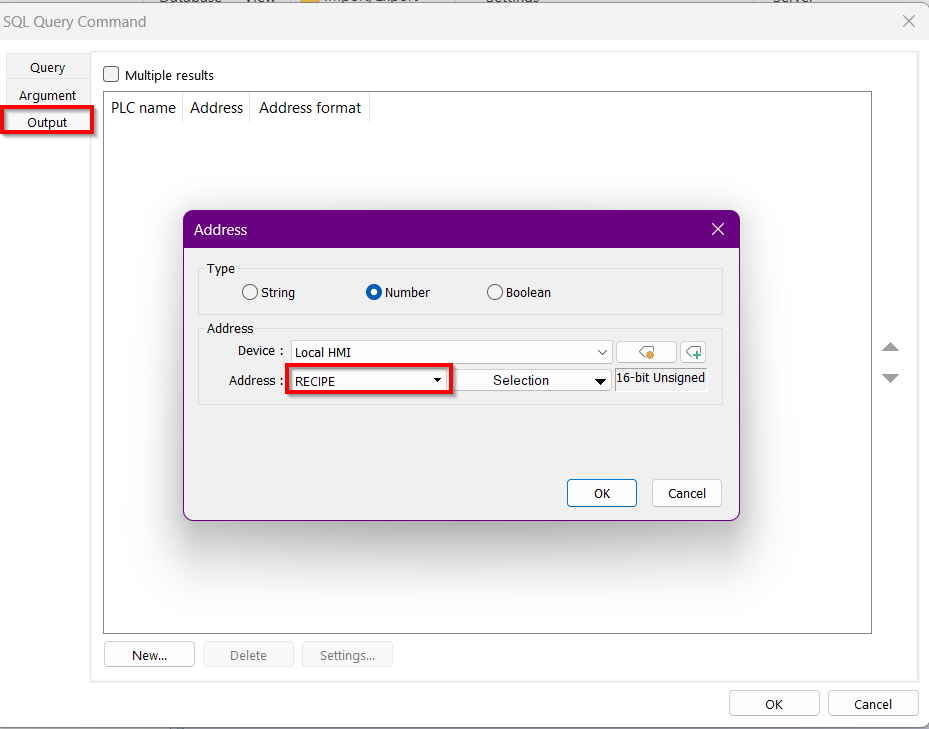
Below is one of our tutorials on the SQL Query Object. Around the 12-minute mark, it shows how to pull data from your database and place it in a local register. To save your data to a Recipe object, select “Recipe” in the Output tab, then choose the appropriate field for the data.
Please let me know if you have any questions.
I’m not successful at this…
If i command the query (execute) and point the output to given recipe the data isn’t showing up in the recipe results object. (Data shows up in SQL query results viewer) I also don’t know what happens to your query results if it has multiple rows of data, in this case i fell as if i should be turning on the option for multiple rows but the option isn’t available to output to a recipe.
Sorry for all the questions…
Hi @outbound6 ,
Its all good, thank you for the questions, we appreciate them!
After consulting with a colleague a better solution would be to get the data from the SQL Query object. Place it into LW memory, RW if you require more space, then use a macro to transfer that data into the recipe database.
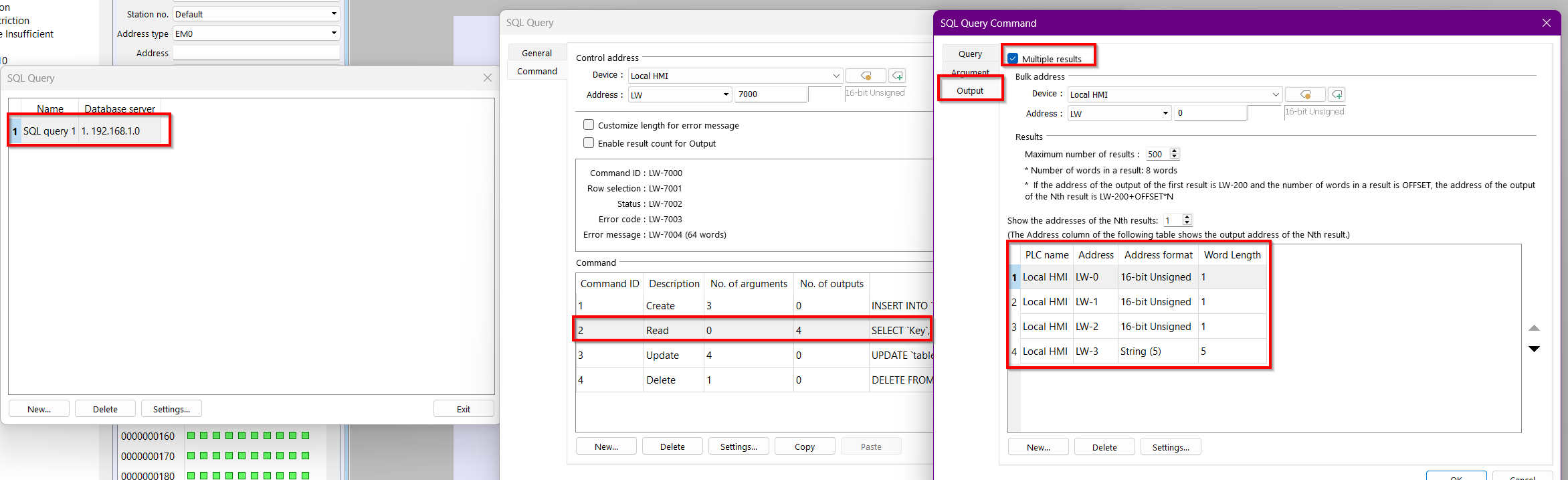
To get the data into LW memory please go to your SQL query, in advanced mode, and within the Read command select Multiple results within the output tab. Also ensure the bulk address is a free within your project and causes no memory overlap.
Now that we have the data on the HMI memory we will use a macro to:
macro_command main()
	short read = 2, add = 1, delete_all = 4
	short key = 0, value_1 = 0, value_2 = 0
	char value_3[10] = {0,0,0,0,0,0,0,0,0,0}

	// Read from SQL and output to LW
	SetData(read, "Local HMI", LW, 7000, 1)

	// A delay to import data from SQL
	DELAY(60000)

	// Clear recipe
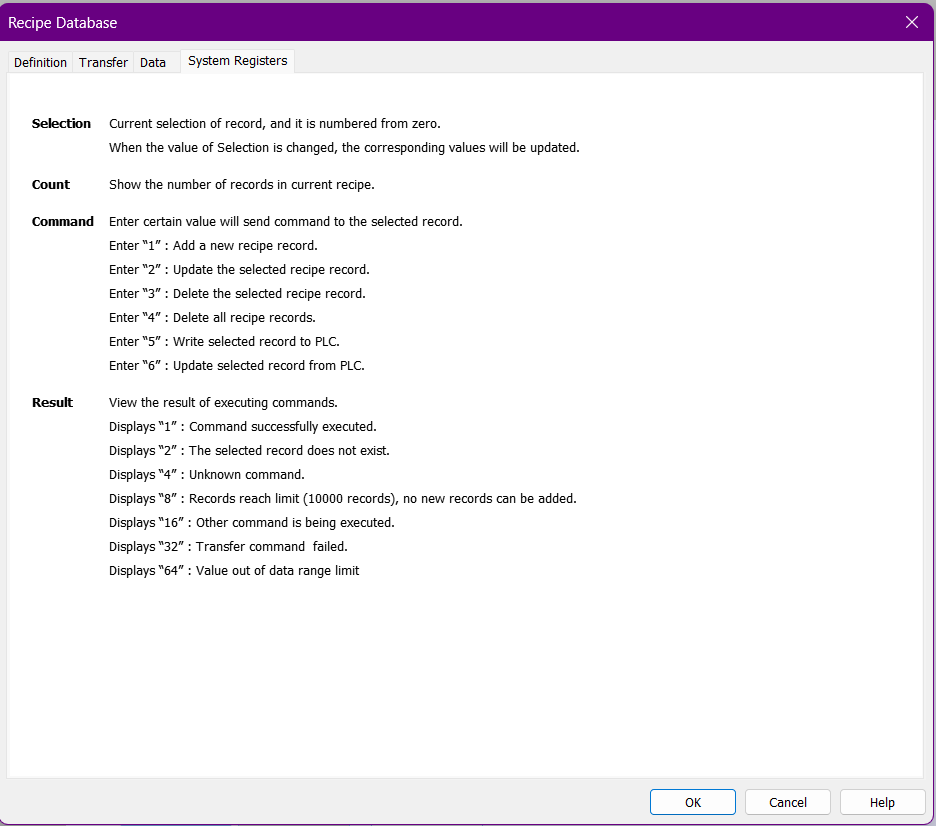
	SetData(delete_all, "Local HMI", RECIPE, "Recipe.Command")

	// Now we can move data into recipe
	short i = 0
	for i = 0 to 499
		GetData(key, "Local HMI", LW, 0 + i * 8, 1)
		GetData(value_1, "Local HMI", LW, 1 + i * 8, 1)
		GetData(value_2, "Local HMI", LW, 2 + i * 8, 1)
		GetData(value_3[0], "Local HMI", LW, 3 + i * 8, 10)

		DELAY(10)
		SetData(key, "Local HMI", RECIPE, "Recipe.Key")
		SetData(value_1, "Local HMI", RECIPE, "Recipe.Value_1")
		SetData(value_2, "Local HMI", RECIPE, "Recipe.Value_2")
		SetData(value_3[0], "Local HMI", RECIPE, "Recipe.Value_3")

		DELAY(50)
		SetData(add, "Local HMI", RECIPE, "Recipe.Command")
	next

end macro_command
Below is a link to the demo projects we used for you to reference. Please let us know if you run into any question.
Thank you!
I think i need a little macro help.. I don’t believe i have the getdata correctly…
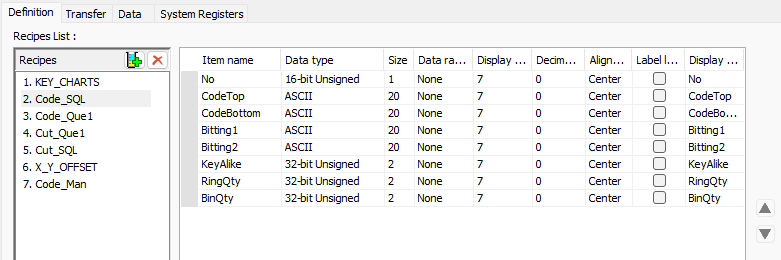
Codetop -. ascii @ 20 words
CodeBottom → ascii @ 20 words
Bitting1 → ascii @ 20 words
Bitting2 → ascii @ 20 words
Keyalike, ringqty, binqty all 32-bit unsigned
GetData(CodeTop[0], “Local HMI”, EM1, 0 + i * 8, 40)
GetData(CodeBottom[0], “Local HMI”, EM1, 1 + i * 8, 40)
GetData(Bitting1[0], “Local HMI”, EM1, 2 + i * 8, 40)
GetData(Bitting2[0], “Local HMI”, EM1, 3 + i * 8, 40)
GetData(KeyAlike, “Local HMI”, EM1, 4 + i * 8, 1)
GetData(RingQty, “Local HMI”, EM1, 5 + i * 8, 1)
GetData(BinQty, “Local HMI”, EM1, 6 + i * 8, 1)
Hi @outbound6 ,
Could you please share the serial number of your HMI for our reference?
From the macro, it looks like you’ve placed your data in EM memory. Could you confirm this and also share your SQL Query + SQL Query Command setup so we can further investigate?
Furthermore, below is a forum post on converting protocol and transferring data that is useful in setting up your macro.
Thank you!
SN: 2505105248
It’s odd because i have a few of these unit and some have the MicroSD and some do not…
Earlier this year the cMT-FHDX-820 was upgraded to include a micro SD slot. Due to this upgrade, the SD option available within EasyBuilder Pro will not apply to some older units.
OK…
Need to know the best way to copy one recipe to another recipe.
Would it be another macro or is there a data transfer that can be ran?
Hi @outbound6 ,
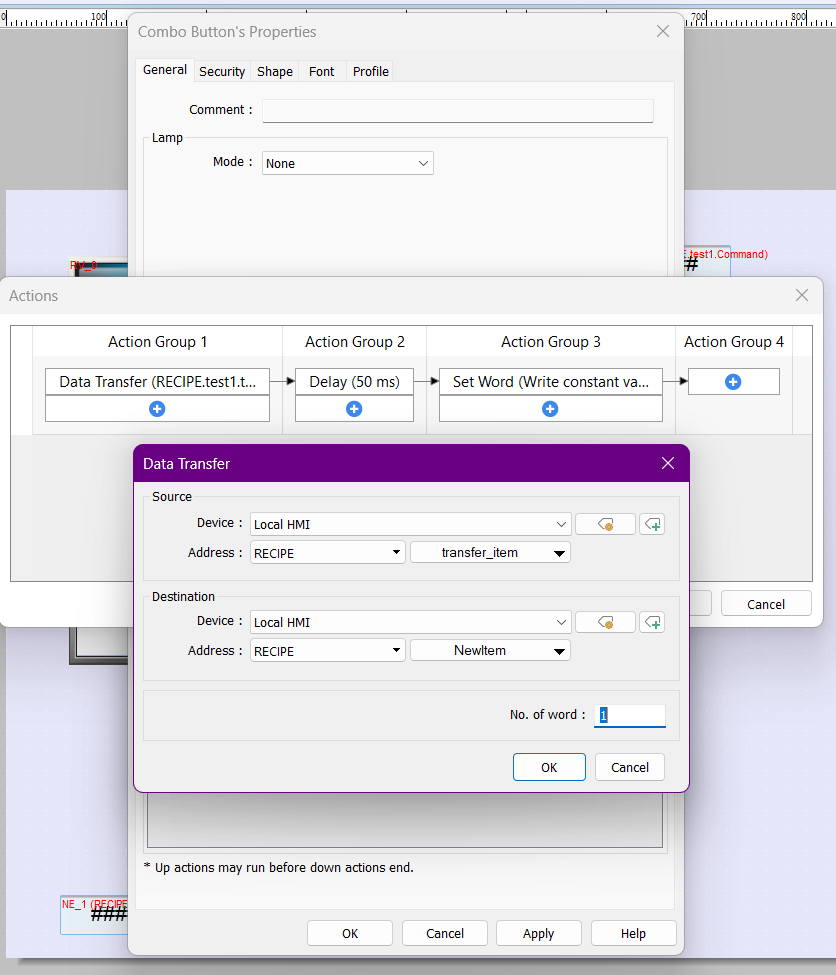
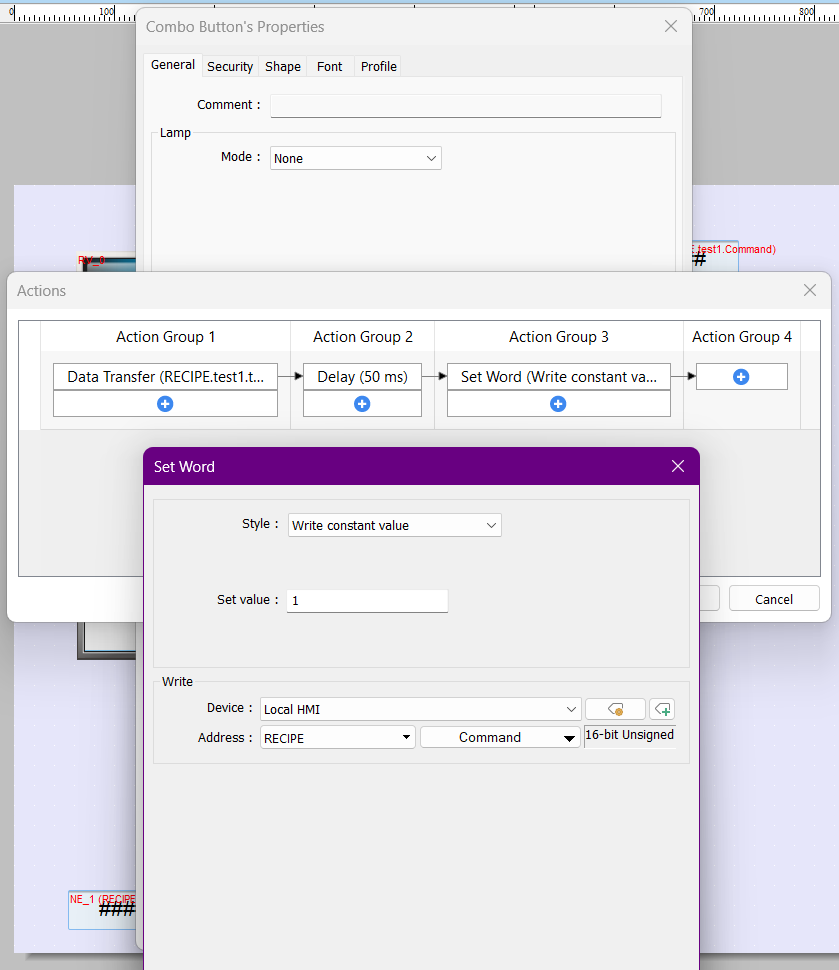
If you just want to transfer the value from one recipe address to another, you can use a combo button like in the image below on the two addresses you want to interact with.
First, set up a data transfer between the two recipe databases and their addresses.
Then set a delay before placing a value of 1 into the recipe command register of the recipe database that is receiving the data.
A Data Transfer object can also be used to do the same and can be found within the Object tab.
Please let me know if this works and if you have any questions.
Thank you!
Data Transfer in combo button setup
Set word within combo button to place a value of 1 into the command register of a recipe
all available values of a recipe object.
Thanks, but i need all the data from one recipe to another. What you provided just copies first row count, unless i misunderstood.
Hi @outbound6 ,
Apologies I misunderstood your last question.
For a full transfer from one recipe to another we would recommend using a macro. In the post below, within the advanced section it shows how to access all the values from a recipe database. Instead of setting the values within a LW register, you add it to the receiving recipe database.
Please let me know if you have any follow up questions.
Got this to work great in simulation mode on PC, but when I loaded and run on the HMI data within the recipe view is missing. All the lines show up but no data. There are ~890 lines of data just as a reference. On the PC it takes some time (which i would like to know how to improve) but all the data is there.
Just for the macro is running a SQL query to database, putting it into EM1
Remove from EM1 and place it into recipe.
Any suggestions as to what could be happening?
Hi @outbound6,
We are glad to hear you got a simulation set up. Could you share images of your recipe database, SQL database, and any other objects related to the communication.
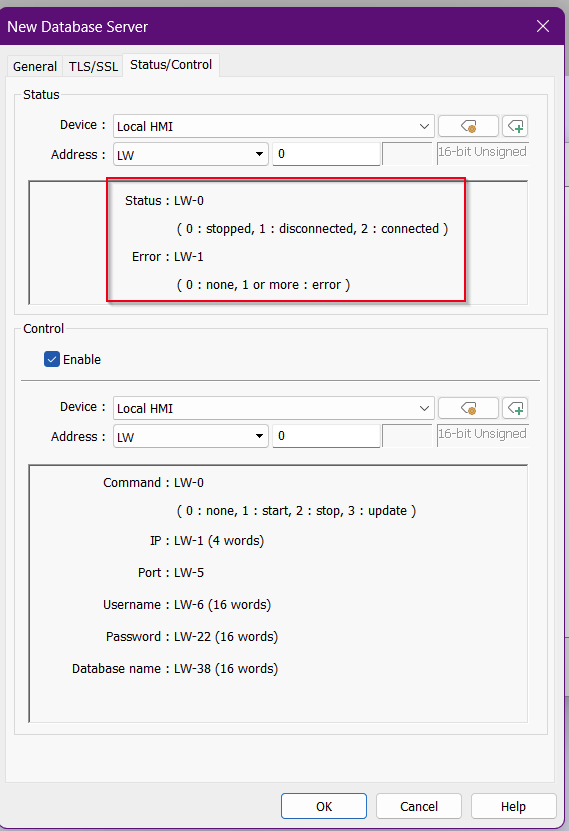
Furthermore, could you also enable Status/Control registers in your Database server set up to ensure there are not errors and a stable connection.
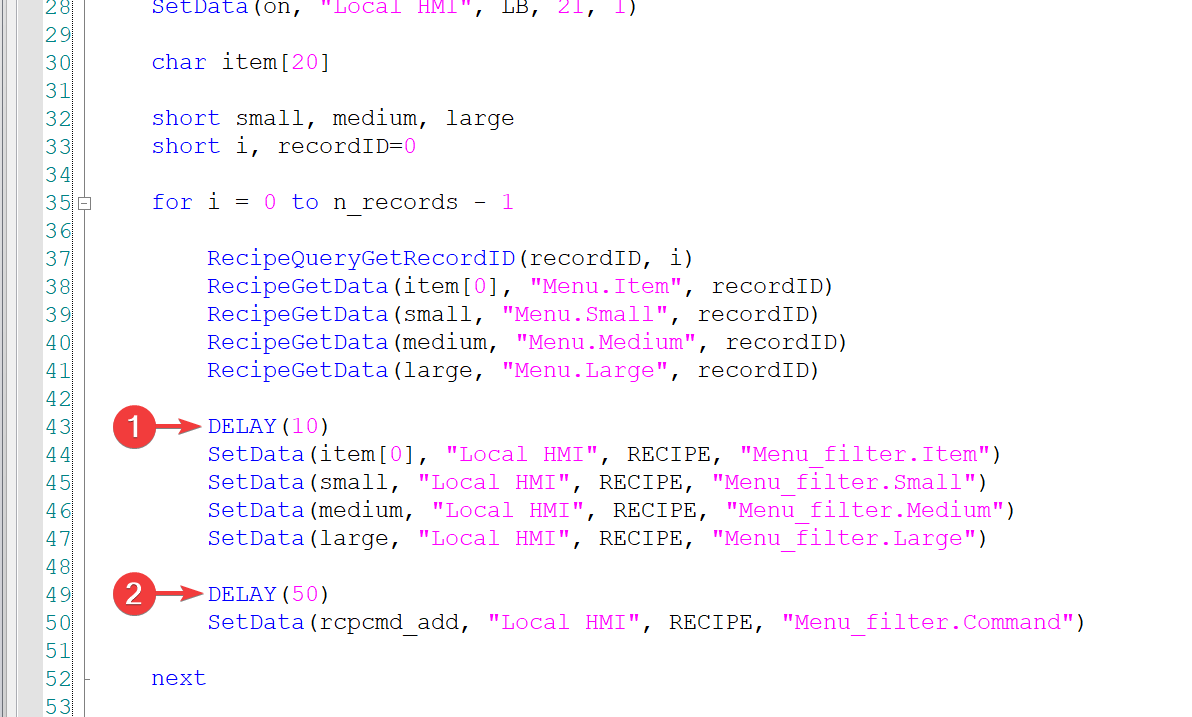
Can you please post a picture of your macro as well? I would recommend adding one delay before transferring a data from EM memory into the recipe and a second delay before using the “add” command to add it to the recipe as in this example:
I do currently have the delay’s in place please see below:
short read = 1, add = 1, delete_all = 4, clear[1000]
	//short Ctn1 = 0
	short KeyAlike = 0, RingQty = 0, BinQty = 0, Ctn
	char CodeTop[40] = {0,0,0,0,0,0,0,0,0,0,0,0,0,0,0,0,0,0,0,0,0,0,0,0,0,0,0,0,0,0,0,0,0,0,0,0,0,0,0,0}
	char CodeBottom[40] = {0,0,0,0,0,0,0,0,0,0,0,0,0,0,0,0,0,0,0,0,0,0,0,0,0,0,0,0,0,0,0,0,0,0,0,0,0,0,0,0}
	char Bitting1[40] = {0,0,0,0,0,0,0,0,0,0,0,0,0,0,0,0,0,0,0,0,0,0,0,0,0,0,0,0,0,0,0,0,0,0,0,0,0,0,0,0}
	char Bitting2[40] = {0,0,0,0,0,0,0,0,0,0,0,0,0,0,0,0,0,0,0,0,0,0,0,0,0,0,0,0,0,0,0,0,0,0,0,0,0,0,0,0}

	// Read from SQL and output to LW/EM0
	SetData(read, "Local HMI", LW, 300, 1)

	// A delay to import data from SQL
	DELAY(50000)

	//Read MySQL Query Count
	GetData(Ctn, "Local HMI", LW, 368, 1)
	Ctn = Ctn - 1

	// Clear recipe
	SetData(delete_all, "Local HMI", RECIPE, "Code_SQL.Command")
	DELAY(2000)

	// Now we can move data into recipe
	short i = 0
	for i = 0 to Ctn
		GetData(CodeTop[0], "Local HMI", EM1, 0 + i * 86, 40)
		GetData(CodeBottom[0], "Local HMI", EM1, 20 + i * 86, 40)
		GetData(Bitting1[0], "Local HMI", EM1, 40 + i * 86, 40)
		GetData(Bitting2[0], "Local HMI", EM1, 60 + i * 86, 40)
		GetData(KeyAlike, "Local HMI", EM1, 80 + i * 86, 1)
		GetData(RingQty, "Local HMI", EM1, 82 + i * 86, 1)
		GetData(BinQty, "Local HMI", EM1, 84 + i * 86, 1)

		DELAY(10)
		SetData(i, "Local HMI", RECIPE, "Code_SQL.No")
		SetData(CodeTop[0], "Local HMI", RECIPE, "Code_SQL.CodeTop")
		SetData(CodeBottom[0], "Local HMI", RECIPE, "Code_SQL.CodeBottom")
		SetData(Bitting1[0], "Local HMI", RECIPE, "Code_SQL.Bitting1")
		SetData(Bitting2[0], "Local HMI", RECIPE, "Code_SQL.Bitting2")
		SetData(KeyAlike, "Local HMI", RECIPE, "Code_SQL.KeyAlike")
		SetData(RingQty, "Local HMI", RECIPE, "Code_SQL.RingQty")
		SetData(BinQty, "Local HMI", RECIPE, "Code_SQL.BinQty")

		DELAY(50)
		SetData(add, "Local HMI", RECIPE, "Code_SQL.Command")
	next
This is trigger by a combo object, executes macro.